
RefTreeAnalyser: Formula Auditing for Excel
Trace formula dependencies, investigate errors, and review workbook structure with RefTreeAnalyser, an add-in for Microsoft Excel.
Follow references across worksheets, see which objects use a cell, and create reports to support your review.
Download the free demoNo license is needed to try the add-in. Demo mode limits some features; a license starts at €45. Compare demo and licensed use.
Explore RefTreeAnalyser
- Why RefTreeAnalyser?
- Screenshots of RefTreeAnalyser
- Version information
- Quick Operating instructions
- Full help
Already using the add-in? Open the full help manual.
On this page
- What is RefTreeAnalyser?
- What you can do
- Free Download
- Ordering licenses
- Money back guarantee
- Video
- User feedback
- Frequently asked questions
- Comments
What is RefTreeAnalyser?
When you inherit a workbook or need to check an unexpected result, RefTreeAnalyser helps you follow the calculation from one cell to another. Precedents supply a formula's inputs; dependents use its result. The reference tree lets you explore both without losing track of the starting cell.
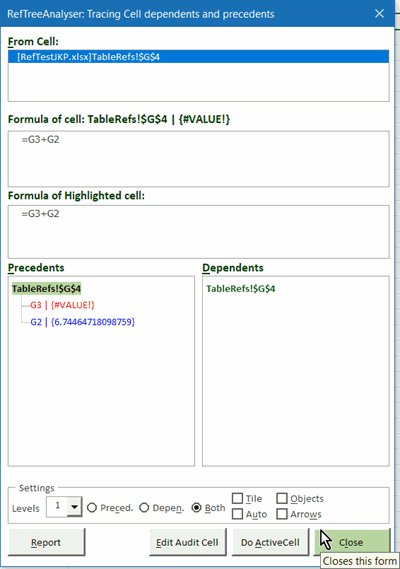
Find a use case that matches your work, or take the visual tour.
What you can do
- Understand dependencies. Explore precedents and dependents across sheets, including references involving charts, PivotTables, controls, data validation and conditional formatting.
- Investigate errors. Trace Errors follows a calculation's inputs; Report Errors lists formula cells returning errors. Circular-reference detection is available in Excel for Windows.
- Review workbook rules. Audit Workbook reports formula issues, data-validation and conditional-formatting rule issues, and missing or inaccessible linked files. Review warnings need your judgment; findings are not repaired automatically.
- Check formula changes. Save and compare formula snapshots to list added, changed and removed formulas. This compares formulas, not calculated values or all workbook content.
- Document and navigate. Generate a workbook table of contents, report formulas, and find worksheets and tables.
- Investigate calculation time. Review worksheet statistics or time a selected range to identify calculations worth investigating.
The interface is available in English, Dutch, French and German. RefTreeAnalyser also integrates FlexFind and Name Manager, which are downloaded and kept updated as companion add-ins.
Free Download
Version 6.0, build 258. Updated Oct 20, 2026.
The download runs in demo mode until you activate a license. Most functions are available, but some have restrictions. For example:
- Dependency tracing is limited to one level in demo mode; licensed users can choose up to 25 levels. Object references are traced to one level.
- Report Errors lists up to 21 error cells in demo mode.
- The Settings screen opens periodically for unlicensed users.
Thisis not a complete list of demo restrictions. See the manual for command-specific limits.
By downloading the file, you give your consent to
the
license conditions.
Follow the installation and first-use
instructions and read the readme.txt supplied with the download.
If the add-in does not appear in Excel, see:
Excel add-ins
fail to load
Supported versions of Excel
- Windows: Microsoft 365, 2024, 2021, 2019, 2016, 2013, 2010, and 2007
- Mac: Microsoft 365. Some features, including circular-reference detection, are unavailable or limited. Read the Mac limitations before downloading.
- Both 32-bit and 64-bit Office are supported on Windows.
Ordering licenses
Buy now (Paypal and credit cards supported)
30-day money-back guarantee. No questions asked.
A license includes:
- Installation and perpetual use of the tool on two computers
- One year of free updates
- License conditions
After the update period ends, you can continue using a version covered by your license on those computers. Keep a backup of that version: a later download requires a renewed license. Read about registration and updates.
Prices
For questions about long-term update coverage or other licensing arrangements, contact me. Standard licenses already include perpetual use of versions covered by their update period.
Money back guarantee
If you are in any way dissatisfied with RefTreeAnalyser, contact me within 30 days after your purchase and I'll issue a refund.
Video
Watch a walkthrough of formula tracing and other RefTreeAnalyser tools. For screenshots of the audit and formula-comparison reports, see the visual tour.

User feedback
A few comments from users:
"I like seeing the values next to the addresses - and the ability to drill down or back up"
"The 'Check Formulas', 'Trace Precedents / Dependents', and 'Object References' features have all proved incredibly useful."
"ToC generation with hyperlinks to all sheets is great as I have many files with lots of tabs."
More user feedback
- "I have been using for many many years. Easy to use and does a great job on all the references such as precedents/dependants Report Formulas is very handy, Function Report is great as reminds me of functions when listed. Its a must have tool for working on complicated spreadsheets with lots of formulas"
- "It works great, makes analyzing any workbook it whichever way you require a cinch. I can seriously advice it to all VBA coders and developers since it simplifies documenting and checking. I started with the Beta version and minor, mostly cosmetics, glitches I reported, and these were almost directly updated on-the-fly."
- "App is very responsive, not bloated with unnecessary features, does the core task well, frequent updates, thoughtful developer notes, efficiency analysis tools like "all sheet stats" are interesting. As an expert modeler / professional large financial transaction model architect focused on squeezing every ounce of efficiency, speed, and responsiveness, I rely on many of the features when auditing/analyzing my models. Easily my favorite tool vs competitors. I use my own personal shortcuts / macros for formatting so the lack of formatting macro bells and whistles (I turn these off) is a positive rather than a negative"
- "'All Sheet Stats' and 'Time Selected cells' functions"
- "1. The report of dependent cells shown in blocks of range
2.Circular refs report" - "Ability to easily see precedents in complex formulas"
- "Ability to trace formulae - this is an essential - together with evaluating each cell individually"
- "all sheet stats higlight cells price...."
- "being able to click on a named variable in the precedents list and have the active cell change to that location"
- "Calc Time, Precedents/Dependents" "clear self-explanatory layout"
- "Ease of tracing formulas"
- "Ease of use to see complex cells relationships"
- "enhanced display of successors and precidents"
- "Everything :)"
- "Flexibility to adapt it as I like it better and responsiveness (some other tools are a little bit slow)."
- "From tools which work I like speed measurement - All Sheets stats. And of cours Clear Arrow :-|"
- "Great auditing feature" "Highlighting"
- "I like seeing the values next to the addresses - and the ability to drill down or back up"
- "Intuitive. Great documentation. Useful functions."
- "It keeps improving. "
- "It meets my needs. I have some older spreadsheet/VBA tools that did not follow some of the better code design methods. The tool helps me to find and reduce inefficient code "
- "It saves me a lot of time on formula analysis"
- "It works when needed and stays in the background when not needed. It keeps improving. "
- "love the equation display table of contents"
- "Offering better visibility into formulas than the build in features in Excel"
- "references check"
- "Significant improvement over the standard tool to trace precedents and dependent cells."
- "The 'Check formulas' feature."
- "The 'Check Formulas', 'Trace Precedents / Dependents', and 'Object References' features have all proved incredibly useful."
- "the overview of the dependents"
- "The releases over the last year or so have been rock solid stable. The tracking window stays out of the way until needed. The tool has adopted to the challenges of tracking the table column reference syntax. The tool has expanded ability to document formulas and ranges for control purposes."
- "The user experience tool keeps improving and evolving."
- "ToC generation with hyperlinks to all sheets is great as I have many files with lots of tabs."
- "Tool runs fast and provides very relevant information especially if you are doing Excel modeling work or taking over a complex spreadsheet from someone. Output reports are clear and very helpful to identify bottlenecks and overall file inter-dependencies."
- "Trace Errors"
- "Tracking cell dependents and precedents"
- "Understanding formulas"
- "Very detailed and easy to use"
- "Very hepful"
- "very practical earlier this year on a very complex client workbook no structured refs or named ranges just cell refs and i tried to use the formula analyser from a certain well known workbook speed add-in and couldn't follow it and for the moment forgot about your tool which is sp more visual and better"
- "Visualizing The dependents. "
Frequently asked questions
Do I need to buy a license before trying it?
No. The download works in demo mode without a license key. See the demo restrictions before choosing whether to buy.
Is this a subscription?
The standard license includes perpetual use on two computers and one year of updates. You can keep using an eligible version after that year; newer releases require purchasing a new license.
Does an audit prove that my workbook is correct?
No. Reports help identify technical issues and areas to review. They do not establish whether your business logic, assumptions or results are correct.
Will all features work on my Mac?
Most features work on Mac too. Read the Mac feature limitations; circular-reference detection is Windows-only.
Comments