
RefTreeAnalyser – Advanced Formula Auditing for Excel
Audit complex Excel formulas in seconds. RefTreeAnalyser saves hours of manual work.
Understand complex Excel workbooks at a glance. Visualize precedents and dependents, spot circular references, navigate across sheets and objects, and accelerate audits and troubleshooting.
Download RefTreeAnalyserFree download, no license required.
Key features
 Instant dependency trees
See precedents/dependents for any cell, sheet, or named range. Easily focus on what matters. Understand complex workbooks at a glance.
 Deep
formula insights
Deep
formula insights
Inspect referenced ranges, functions, and links across sheets; quickly surface risky areas and inconsistencies.
 Circular reference detection
Identify all circular references reliably—even those Excel’s default tracer overlooks in large workbooks.
 Works with your workflow
Compatible with Microsoft Excel for Windows. Compatible with Microsoft Excel for Mac.
 See
it in action
See
it in action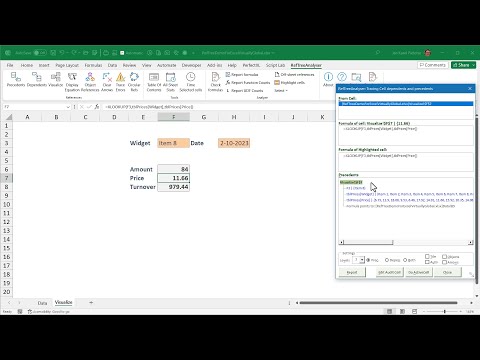
 Unlock its full potential
Get your license today and start auditing spreadsheets smarter!
Content
- What is RefTreeAnalyser?
- Features
- Free Download
- Ordering licenses
- Money back guarantee
- Video
- What Other People Say about RefTreeAnalyser
- More information
- Frequently Asked Questions
- Comments
What is RefTreeAnalyser?
RefTreeAnalyser is an add-in for Microsoft Excel, which helps you understand complicated formulas.
- It makes navigating references in a formula very simple, so you can quickly find out what the sources of a calculation are.
- RefTreeAnalyser comes with a broad set of spreadsheet auditing tools to make your spreadsheet analyst life easier.
Here is a screen-shot of its tab on the Excel ribbon:

And here is a screen-shot of the formula tracer window and of the Visualization of formula precedents on a worksheet:
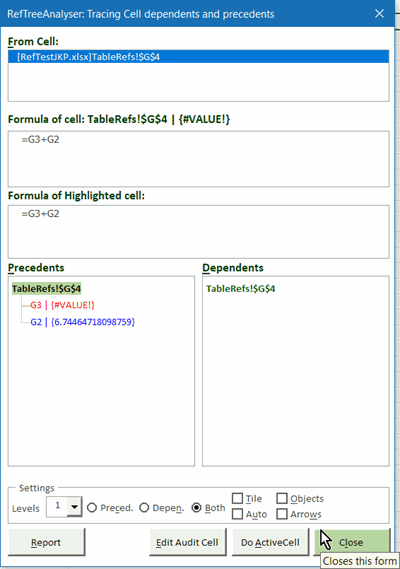
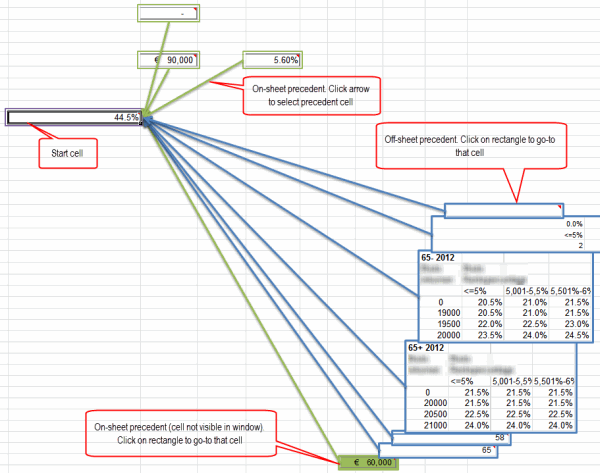
RefTreeAnalyser makes tracing precedents and dependents a lot easier than Excel's built-in tools. Read more about RefTreeAnalyser.
Features
- Easy Auditing of formula dependents and precedents, including object dependencies (charts, pivot tables, form controls, Validation formulas, Conditional formatting formulas, etcetera)
- Find circular references (Excel for Windows only!)
- Trace errors
- Find out which cells are used by objects your file, such
as
- pivot tables
- charts
- conditional formatting
- data validation
- forms and ActiveX controls
- and etcetera
- Generate a table of content containing not just your worksheets, but also your charts, pivot tables and (form) controls
- Time your workbook calculation for each worksheet to find bottlenecks
- Check columns for formula inconsistencies
- Navigate worksheets and tables using a ribbon drop-down
- Includes two of my other popular add-ins: FlexFind and Name Manager and keeps them updated
- UI in English, Dutch, French or German
Free Download
Version 5.1, build 255. Updated Sep 18, 2026.
Try it for free, just download and start working! Without a license only some of the functionality is limited.
By downloading the file, you give your consent to
the
license conditions.
After downloading the file, please read the readme.txt file, it
contains important installation instructions.
In addition, please read:
Excel add-ins
fail to load
Supported Versions of Excel
- Windows: Microsoft 365, 2024, 2021, 2019, 2016, 2013, 2010, and 2007
- Mac: Microsoft 365 (please note that the circular reference detection does not work on Mac Excel)
- Supports both 32 and 64 bit Office
Ordering licenses
Buy now (Paypal and credit cards supported)
30-day money-back guarantee. No questions asked.
A license includes:
- Installation and perpetual use of the tool on two computers
- One year of free updates
- License conditions
Prices
Money back guarantee
If you are in any way dissatisfied with RefTreeAnalyser, contact me within 30 days after your purchase and I'll issue a refund.
Video
Here is a link to a video demonstrating most features of RefTreeAnalyser:

What Other People Say about RefTreeAnalyser
Here is some feedback I received about RefTreeAnalyser:
- "I have been using for many many years. Easy to use and does a great job on all the references such as precedents/dependants Report Formulas is very handy, Function Report is great as reminds me of functions when listed. Its a must have tool for working on complicated spreadsheets with lots of formulas"
- "It works great, makes analyzing any workbook it whichever way you require a cinch. I can seriously advice it to all VBA coders and developers since it simplifies documenting and checking. I started with the Beta version and minor, mostly cosmetics, glitches I reported, and these were almost directly updated on-the-fly."
- "App is very responsive, not bloated with unnecessary features, does the core task well, frequent updates, thoughtful developer notes, efficiency analysis tools like "all sheet stats" are interesting. As an expert modeler / professional large financial transaction model architect focused on squeezing every ounce of efficiency, speed, and responsiveness, I rely on many of the features when auditing/analyzing my models. Easily my favorite tool vs competitors. I use my own personal shortcuts / macros for formatting so the lack of formatting macro bells and whistles (I turn these off) is a positive rather than a negative"
- "'All Sheet Stats' and 'Time Selected cells' functions"
- "1. The report of dependent cells shown in blocks of range
2.Circular refs report" - "Ability to easily see precedents in complex formulas"
- "Ability to trace formulae - this is an essential - together with evaluating each cell individually"
- "all sheet stats higlight cells price...."
- "being able to click on a named variable in the precedents list and have the active cell change to that location"
- "Calc Time, Precedents/Dependents" "clear self-explanatory layout"
- "Ease of tracing formulas"
- "Ease of use to see complex cells relationships"
- "enhanced display of successors and precidents"
- "Everything :)"
- "Flexibility to adapt it as I like it better and responsiveness (some other tools are a little bit slow)."
- "From tools which work I like speed measurement - All Sheets stats. And of cours Clear Arrow :-|"
- "Great auditing feature" "Highlighting"
- "I like seeing the values next to the addresses - and the ability to drill down or back up"
- "Intuitive. Great documentation. Useful functions."
- "It keeps improving. "
- "It meets my needs. I have some older spreadsheet/VBA tools that did not follow some of the better code design methods. The tool helps me to find and reduce inefficient code "
- "It saves me a lot of time on formula analysis"
- "It works when needed and stays in the background when not needed. It keeps improving. "
- "love the equation display table of contents"
- "Offering better visibility into formulas than the build in features in Excel"
- "references check"
- "Significant improvement over the standard tool to trace precedents and dependent cells."
- "The 'Check formulas' feature."
- "The 'Check Formulas', 'Trace Precedents / Dependents', and 'Object References' features have all proved incredibly useful."
- "the overview of the dependents"
- "The releases over the last year or so have been rock solid stable. The tracking window stays out of the way until needed. The tool has adopted to the challenges of tracking the table column reference syntax. The tool has expanded ability to document formulas and ranges for control purposes."
- "The user experience tool keeps improving and evolving."
- "ToC generation with hyperlinks to all sheets is great as I have many files with lots of tabs."
- "Tool runs fast and provides very relevant information especially if you are doing Excel modeling work or taking over a complex spreadsheet from someone. Output reports are clear and very helpful to identify bottlenecks and overall file inter-dependencies."
- "Trace Errors"
- "Tracking cell dependents and precedents"
- "Understanding formulas"
- "Very detailed and easy to use"
- "Very hepful"
- "very practical earlier this year on a very complex client workbook no structured refs or named ranges just cell refs and i tried to use the formula analyser from a certain well known workbook speed add-in and couldn't follow it and for the moment forgot about your tool which is sp more visual and better"
- "Visualizing The dependents. "
More information
- Why RefTreeAnalyser?
- Screenshots of RefTreeAnalyser
- Version information
- Quick Operating instructions
- Full help
Frequently asked Questions
What is RefTreeAnalyser and how does it help with Excel formula auditing?
What are the key features of RefTreeAnalyser?
Where can I download RefTreeAnalyser for free?
What does a RefTreeAnalyser license include and how can I order one?
Is there a money back guarantee for RefTreeAnalyser?
Where can I find a video demonstration of RefTreeAnalyser?
What do other users say about RefTreeAnalyser?
Does RefTreeAnalyser support tracing circular references in Excel?
Comments