
Name Manager: Range names made easy

Content
- Description
- Download
- Teams and Online version
- Latest additions (in reverse chronological order):
- Features
- Instructions
- History
- Donate
- Note to Lambda developers
Description
If you are in need of a utility to manage defined names in your Excel models, this one is a must-have. List all names in your active workbook. Filter them using 14 filters, e.g. "With external references", "With errors", Hidden, Visible. Show just names that contain a substring. Show just names unused in worksheet cells. Edit them in a simple dialog or make a list, edit the list and update all names in one go. Delete, hide, unhide selected names with a single mouse click.
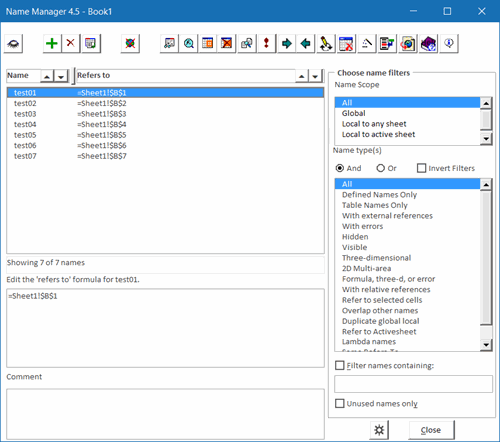
The Excel Name Manager add-in was created (and is maintained) in collaboration with Charles Williams, www.decisionmodels.com. Matthew Henson (mhenson@mac.com) helped us ensure the utility works on Mac Excel too.
The Name Manager is free, all I'd like to ask you is to tell everyone
if you like it and to tell me if you don't.
Download
Current Excel versions
This is the one to download if you are on any of these versions: Microsoft 365 (both Windows and Mac, both 32 and 64 bit), Excel for Windows 2024, 2021, 2019, 2016, 2013, 2010.
Name Manager for most Excel versions V4.5, Build 725, May 7, 2026.
Version for old Mac systems
GOOD NEWS! Name Manager also works on Mac Excel (if all is well). Just in case this does not apply to your Mac version: for your convenience
Name Manager 2.3 is still available.
Very old Excel versions
If you're still using one of the antique versions of Excel (97, 2000, XP and 2003) this is your download: Name Manager for very old Excel versions V4.3, build 655, Dec 13, 2016
Teams and Excel on-line version (and desktop)
Using Excel online or Excel in Teams? Use our office-js version of Name Manager. The only tool allowing you see all range names in Excel online! Note that this version also works on desktop Excel.
Latest additions (in reverse chronological order):
- Fixed issue regarding Excel workbook window switching behavior
- Fixed a bug pertaining to grouped shapes
- Small bugfix
- Updated the translations for several languages
- Updated colors, new system name category added
- Updated the Reset button code to solve an issue with the NM form not appearing -again-
- Fixed a small bug related to finding out where a name is in use
- When user changes the short-cut key, the old shortcut is not reset. This has been fixed in build 713
- Added a new system name to the Excel system names filter
- Bug fix; fixed an error when the NM window is maximized
- Now renaming a name ensures Power Query queries are updated
- Updated the Reset button code to solve an issue with the NM form not appearing
- Removed 240 character limitation from the Edit RefersTo box
- Fixed a bug regarding filtering for system names
- Hid private functions from macro dialog
- Fixed an issue pertaining to renaming and using the pickup function for users using an international keyboard
- Fixed a small bug in the Reset button's code
- Name Manager now works together with Charles Williams Lambda Explorer if you've got that installed
- Fixed a bug regarding listing all names on a protected workbook
- Added a workaround for a rare dll error some users get
- Moved settings to a separate dialog
- Slightly improved performance
- Small bug fix
- When searching for unused names, filtered chart series are now included
- The VBE Name toolbar now remembers its position
- Filter names containing Lambda functions
Features
- Sorting of names and RefersTo formulas
- Functionality to edit names that refer to large multiple areas.
- Add name dialog
- Shortcut key (default control-shift-n) to start Name Manager
- Choice between icons on commandbuttons or text labels (see Screenshot).
- Rename a name. Name Manager includes a rename option, which will enable you to change the name of a name and have all objects that use that name update too. (this includes VBA)
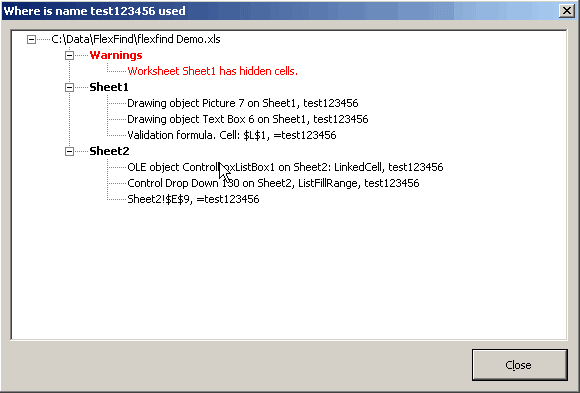
- Show where a name is in use:
- International version, screens and messages in national languages:
- English
- Dansk
- Deutsch
- Français
- Nederlands
- Português (Brazil)
- Svenska
- Suomi
- Español
- Italiano
- Русский
- Croatian
- Afrikaans
- Analyse Command, allows partial evaluation of names etc.
- Many different filter options
- Settings dialog with options for:
- Confirm Changes
- R1C1 Notation
- GoTo Selected Names
- Show RefersTo
- Show Excel System Names
- Sort Names (sort local names together by sheet)
- Highlight named Ranges
- Clear Highlights
- Form can be resized, including minimise/maximise buttons and moving of splits
Instructions
Click the link above that says "Name Manager for most Excel versions". This will download a file named "NameManager2007.zip". Unpack the files in the zip file to a folder of your liking and open the file called "Setup Name Manager.xls". Press the button in that file to install.
Click here to request support or issue comments or suggestions on this product.
History
If you'd like to know how this add-in came to exist, read the Name Manager history page
Donate
If you really like Name Manager (office-js edition), please consider donating to help support it's future development:
Note to Lambda developers
I highly recommend the Excel Lambda Explorer for Windows and Mac https://www.decisionmodels.com/FastExcelLambdaExplorer.htm
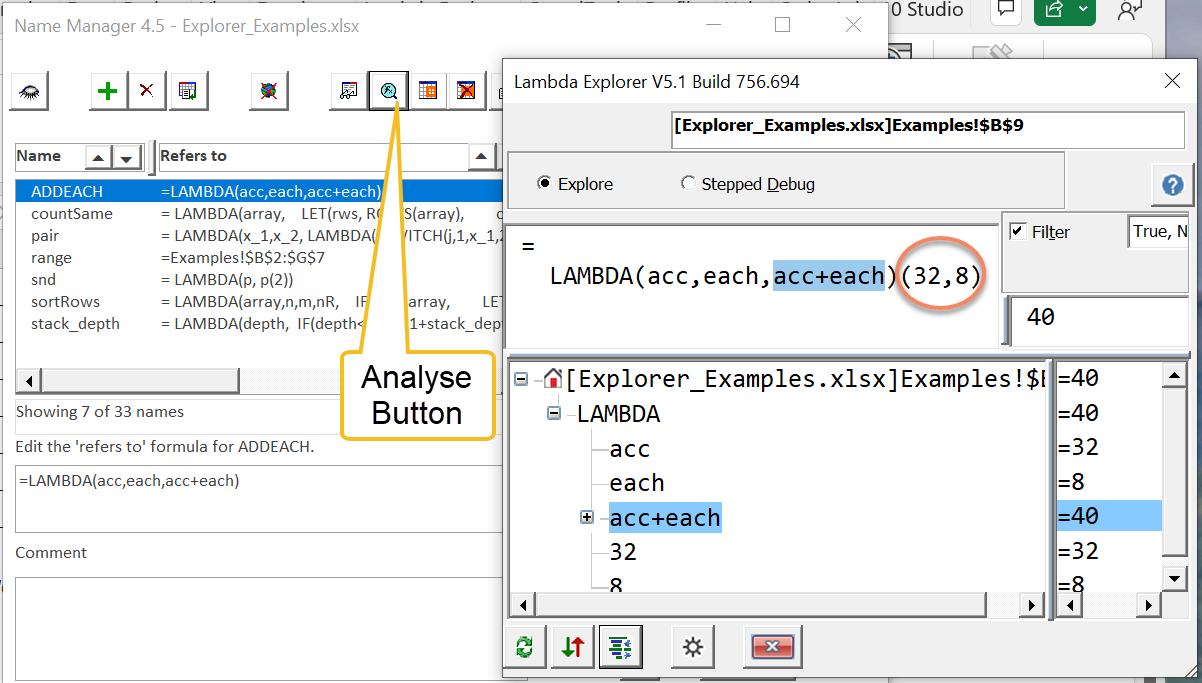
Excel Lambda Explorer is a FREE Excel Addin tool designed to make it easy to explore, understand and debug Excel Lambda Functions. Lambda Explorer and Name Manager work together: clicking the Name Manager Analyse button will prompt for parameter values for the selected Lambda and then launch Lambda Explorer using these values.
This is what the Excel Lambda Explorer looks like:
Feedback from users
From Jeremy (Assistant Controller):
"I just want to say that your Name Manager has saved our company tons of time and think its a great tool. We had files riddled with hidden names that were causing the files to take forever to open. Not sure why Excel's native Name Manager doesn't show hidden names, but love your product and will promote it when I can."
Frequently asked Questions
What is the Name Manager utility used for in Excel?
Which Excel versions are compatible with the current Name Manager download?
Is there a version of Name Manager available for older Mac Excel systems?
How can compile errors related to Name Manager be resolved?
What are some of the latest features and bug fixes added to Name Manager?
What are the key features of Name Manager?
How do I install Name Manager after downloading it?
How can users support the future development of Name Manager?
How does Name Manager integrate with the Excel Lambda Explorer?
Comments