
Flexfind: Search and Replace in all Objects of Excel
What is FlexFind
Flexfind is an Excel add-in which eases searching throughout an entire Excel workbook and all of the objects inside. Enter a string to search for and get a list of all found locations. Click on an entry to go there. Select workbook, sheet or range searching. Replace with another string in the found items you select. At your wish, get a confirmation for each occurrence found (also within one cell).
Click here if you need FlexFind in Teams or in the Browser
What makes FlexFind unique is that it is capable of searching through close to everything in your workbook. FlexFind can search (and replace) in Values or Formulas of:
- Cells
- Conditional formatting
- Data Validation
- Range Names
- Form controls
- ActiveX controls
- Charts (and anything you can place on a chart)
- Headers and footers
- Comments
- Hyperlinks
- Notes
- VBA code
- (Power) Queries
- Pivot Tables
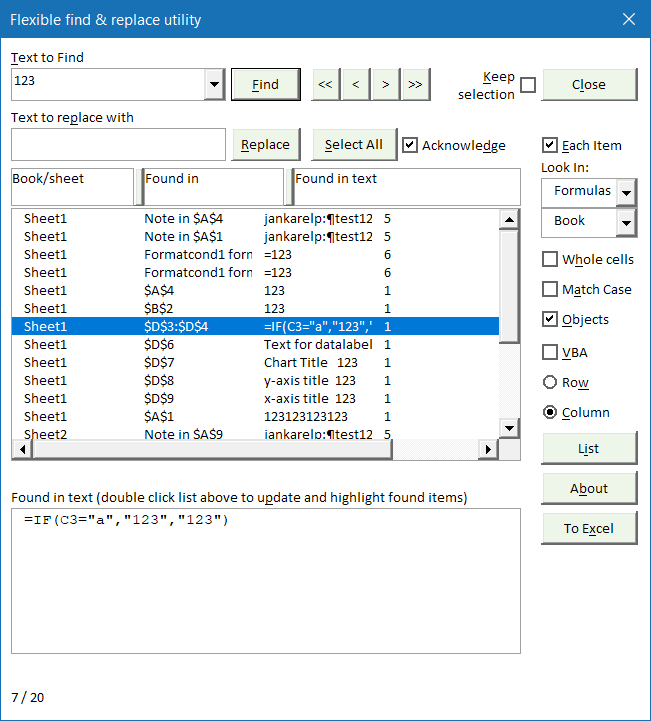
Ever needed to replace a company name in the title of 25 charts? Or replace just the third occurrence of a cell address in some cells' formulas? Or change a part of the header of 6 sheets? Or in your VBA macro's? Flexfind enables you to do so.
Flexfind is free of charge and works in Excel 2003, 2007, 2010, 2013, 2016, 2019, 2021, 2024 and 365. Both 32 and 64 bits.
Donate
If you really like Flexfind, please consider donating to help support it's future development:Downloads
Please read: Excel add-ins fail to load
Current versions of Excel (Windows and Mac)
Download Flexfind v5.3, build 645. 12 October 2026
This is the version for all versions as of Excel 2007, including Mac Excel (beta).
This version cannot be used with versions prior to Excel 2007.
Excel on-line and Teams
Looking for a version that runs in both Desktop Excel and in Web
Excel (and in Teams)?
Try the Office Add-in version here.
Old Mac version
For Mac users having issues with the 2007 version above, Flexfind 5.1 is still available.
Recent Changes
5.3, build 644: Fixed issue with multiple displays
5.3, build 643: Fixed issue where focus cell setting wasn't restored to user setting.
5.3, build 642: Fixed error caused by Power Query queries with M code over 500 characters
5.3, build 641: When the Flexfind dialog is open, Events are now turned off and Focus cell is switched on
5.3 build 640: Fixed issue with grouped shapes
5.3 build 639: Now available in Dutch, English, French, and German!
5.3 build 638: Fixed an issue. When you changed the shortcut key the old shortcut wasn't disabled
5.3 build 637: Fixed issue with replace text not being same as in form
5.3 build 636: Now allows changing the short-cut key to launch FlexFind
5.3 Build 635: Remembers the Scope search setting between sessions
5.3 Build 634: Group identical CF rules as single range, enable search and replace in range address
5.3 build 633: Notes errors during checking Data validation settings of merged cells
5.3 Build 632: Remembers search settings
5.3 Build 631: Updated screen colors
5.3 Build 630: When on empty cell, or when changing from Values to Formula search, do not clear the Find box.
Installation Instructions
Download the correct zip file using the links above. Unpack the files in the zip file to a folder of your liking and open the file called "Setup Flexfind.xls". Press the button in that file to install.
Frequently asked Questions
What is FlexFind and how does it help in Excel?
Which Excel objects can FlexFind search and replace in?
Can FlexFind replace text in VBA code and Pivot Tables?
Is FlexFind free and which Excel versions does it support?
How can I support the future development of FlexFind?
Where can I download the latest version of FlexFind for Windows and Mac?
Is there a version of FlexFind that works with Excel Online?
How do I install FlexFind after downloading it?
Comments