
Opening Corrupt Excel files
Sometimes one gets unlucky and a file is corrupted. This may result in the file not opening at all or in error messages during opening.
Here are some options to try and open a corrupt file or retrieve information out of it.
- Set calculation to manual( Open Excel, Choose File, Options from the menu, click the Formulas tab and choose Manual. Hit OK. Now try to open the file.
- Open the file, but disable macros (assuming you've set macro security to medium: File. Options, Trust Center, Trust Center settings, Macros tab)
- As soon as you've clicked the disable macros button, press control-pageup or control-pagedown, thus changing sheets. Sometimes the corruption is inside a chart on a specific sheet, changing the sheet to another may prevent a crash, enabling you to copy the other sheets.
If that does not work, try creating a link to the file in an empty cell in a fresh workbook. Type this formula (adapt path, filename and sheetname):
='c:\my documents\[MyFileName.xls]Sheet1'!A1
and copy right and down. This at may get you the worksheets values.
if you don't know the sheet names, omit it by entering this:
='C:\PathToFile\[MyFileName.xls]'!A1
and press enter. If Excel is able to extract them, it will prompt you for a sheet name.
Sometimes the Excel viewer, Word or even Internet explorer enables you to open the file and copy information out of it.
If the file is not protected, maybe you can open it with OpenOffice (www.Openoffice.org).
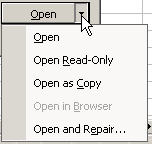
Also, Excel can sometimes repair XL files with trouble. Simply choose File, open, select the problem file and instead of simply hitting the "Open" button, click to the right of it on its tiny down arrow to expose more options (see screenshot below)
Finally, sometimes a corrupt file that still can be opened, can be cured by copying all of its worksheets to a new workbook.
Frequently asked Questions
What are common symptoms of a corrupt Excel file?
How can setting calculation to manual help in opening a corrupt Excel file?
What steps should I take to open a corrupt file with macros disabled?
How can switching sheets prevent Excel from crashing when opening a corrupt file?
How do I use formulas in a new workbook to extract data from a corrupt Excel file?
What should I do if I don't know the sheet names in a corrupt Excel file?
Can other programs like Excel Viewer or OpenOffice open corrupt Excel files?
How can Excel's repair feature be used to fix a corrupt file?
What is the method to recover data by copying worksheets to a new workbook?
Where can I find the option to open a file with repair in Excel?
Comments