
Rounding all numbers in the selection to a fixed number of digits
Introduction
When doing analysis of measured data, it is customary to show the results in a fixed number of digits, called the significant digits. The number of digits depends on the accuracy of the measurement itself.
Whilst Excel has several methods to round your results, there is none that can handle rounding to a specified number of digits, like this:
Of course you could use scientific notation (see screenshot), but in
my experience many people (including executives reading your report)
have a hard time understanding 1.23E-1, whereas understanding 0.123 is
quite within reach.
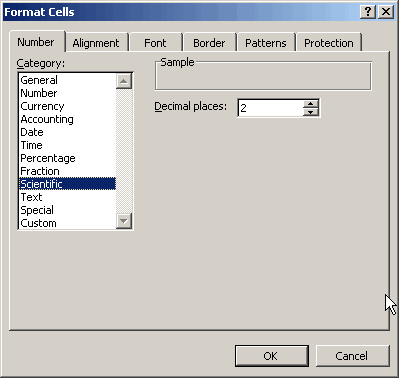
Figure 1: Number format, Scientific notation
This is why I wrote this little subroutine, which rounds all numbers in the selection to the number of digits specified:
Dim dDigits As Double
Dim iCount As Integer
Dim iRoundDigits As Integer
Dim rArea As Range
Dim rCell As Range
Dim rRangeToRound As Range
Dim sFormatstring As String
Dim vAnswer As Variant
On Error Resume Next
Set rRangeToRound = Selection
If rRangeToRound Is Nothing Then Exit Sub
vAnswer = InputBox("How many digits?", "Rounding function")
If TypeName(vAnswer) = "Boolean" Then Exit Sub
If vAnswer = "" Then Exit Sub
iRoundDigits = CInt(Application.Max(1, vAnswer))
On Error GoTo 0
For Each rArea In rRangeToRound.Cells
For Each rCell In rArea
If IsNumeric(rCell.Value) And rCell.Value <> "" Then
sFormatstring = "0"
If rCell.Value = 0 Then
dDigits = 3
Else
dDigits = Log(Abs(rCell.Value)) / Log(10)
dDigits = -Int(dDigits) + iRoundDigits - 1
dDigits = Application.Min(Len(Abs(rCell.Value)), dDigits)
End If
If dDigits >= 1 Then
If Int(rCell.Value) = 0 Then
sFormatstring = sFormatstring & "." & String(dDigits - 1, "0")
Else
sFormatstring = sFormatstring & "." & String(dDigits, "0")
End If
ElseIf dDigits < 0 Then
sFormatstring = sFormatstring & "." _
& String(iRoundDigits - 1, "0") & "E+00"
End If
rCell.NumberFormat = sFormatstring
End If
Next rCell
Next rArea
End Sub
Listing 1: Code to change format of cells so they just show significant digits.
Acknowledgements
Thanks to Matthew Adams Rasmussen for correcting a small bug regarding rounding e.g. 0.995 to 0.100 instead of to 0.10 when rounding to 2 significant digits.
Frequently asked Questions
What is the purpose of rounding numbers to a fixed number of digits in data analysis?
Why is it important to show results with significant digits based on measurement accuracy?
What are the limitations of Excel's built-in rounding methods for significant digits?
How does scientific notation compare to fixed-digit rounding in terms of readability?
What is the main functionality of the provided VBA subroutine RoundToDigits?
How does the RoundToDigits subroutine determine the number of digits to round to?
What happens if the user cancels or inputs an invalid value in the rounding digits prompt?
How does the subroutine handle rounding for zero values differently?
What formatting string does the subroutine apply to cells after rounding?
Who contributed to fixing a bug in the rounding code and what was the issue?
Comments