
JKP Application Development Services.

                    Microsoft Office Application Development

Corrupt Files

Up • Defined Names • Corrupt Files • Create Addins • Startup Problems • Chart an Equation • Show Picture • Round2Digits • Control Events • Custom Find • FormulaWrapper • Disable Events • Workbook Open Bug • WebQuery • Register UDFs • Undo With Excel VBA • Select a range (VBA) • Transpose Table • Docking VBE Windows • Excel 2007 Tables • Excel 2007 Tables (VBA) • Update An Addin • Addin Installation • Object Lister • Excel 2007 FileFormat • Catch Paste

•  •

Search Zoeken

WWW
This site

Go to Ga Naar
Home
Up

Donate Donaties
Did you find something helpful on my site? Consider a donation!
Heeft u iets gevonden waar u wat aan had? Overweeg dan een donatie!


Opening Corrupt Excel files

Sometimes one gets unlucky and a file is corrupted. This may result in the file not opening at all or in error messages during opening.

Here are some options to try and open a corrupt file or retrieve information out of it.

  1. Set calculation to manual( Open Excel, Choose Tools, Options from the menu, click the Calculation tab and choose Manual. Hit OK. Now try to open the file.
  2. Open the file, but disable macros (assuming you've set macro security to medium: Tools, Macro, security)
  3. As soon as you've clicked the disable macros button, press control-pageup or control-pagedown, thus changing sheets. Sometimes the corruption is inside a chart on a specific sheet, changing the sheet to another may prevent a crash, enabling you to copy the other sheets.

If that does not work, try creating a link to the file in an empty cell in a fresh workbook. Type this formula (adapt path, filename and sheetname):

='c:\my documents\[MyFileName.xls]Sheet1'!A1

and copy right and down. This at may get you the worksheets values.

if you don't know the sheet names, omit it by entering this:

='C:\PathToFile\[MyFileName.xls]'!A1

and press enter. If XL (2000) is able to extract them, it will prompt you for a sheet name.

Sometimes the Excel viewer, Word or even Internet explorer (v5) enables you to open the file and copy information out of it.

If the file is not protected, maybe you can open it with OpenOffice (www.Openoffice.org).

Also, Excel XP and 2003 can sometimes repair XL files with trouble. Simply choose File, open, select the problem file and instead of simply hitting the "Open" button, click to the right of it on its tiny down arrow to expose more options (see screenshot below)
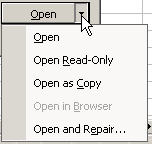
Finally, sometimes a corrupt file that still can be opened, can be cured using this method (Excel 2000 or up):

  1. Open the file
  2. Save-as filetype Webpage
  3. Close the file
  4. Open the html file
  5. Save-as normal Excel workbook.
 

Please rate this article:

(Rated: 334 times, average rating: 6.1)

Comments

Showing last 15 comments of 22 in total (Show All Comments):


Comment by: Jan Karel Pieterse (10/10/2006 11:28:30 PM)

Hi Allie,

Hmm. Are you saying you cannot access the entire folder? If so, this sounds like either a file system problem or a hardware fault.

You might consider asking around on one of the windows newsgroups of Microsoft:

http://www.microsoft.com/communities/newsgroups/en-us/default.aspx?dg=microsoft.public.windowsxp.general&cat=en_US_91a15a1e-b269-4291-b6b4-dc2d504ce9ef&lang=en&cr=US

Regards,

Jan Karel


Comment by: Anant Basant (2/20/2007 5:55:27 AM)

Thanks Jan for this tip on corrupt files. It saved me at least 8 hours of my life today 20-Feb-2007.


Comment by: Jan Karel Pieterse (2/20/2007 6:37:53 AM)

Hi Anant,

You're welcome.

And thanks for sharing this with us!


Comment by: Yogesh (6/24/2007 7:30:15 PM)

Thank you very much, It helped me to get my data back from a corrupted excel file. Keep going....


Comment by: dot (7/6/2007 8:36:28 AM)

I have a corrupt file that I want to get rid of. How do I do that?????


Comment by: Jan Karel Pieterse (8/1/2007 10:00:55 PM)

Hi Dot,

Just delete the file using Windows Explorer.


Comment by: Bill (8/14/2007 3:44:03 PM)

Hi folks,

I just jumped through many of these hoops with an Excel 2007 file that got corrupted. I just could not open the beast using any method.

Finally, I tried opening it using MS Explorer. (ver 6.0.29 SP 2) Worked like a charm! I was able to save it in an Excel format and re-open it in Excel.

FYI, y'all. You probably want to try the above methods first.


Comment by: john (9/21/2007 5:02:58 AM)

OK first, thanks for your kindness in sharing your experience without a price tag.My problems with corrupted files did'nt start until I downloaded free software from PC mag.etc.So now I must find a way to get my system restore back as it is now unoperable and I get a message back that the file is corrupt.This computer is driving me to drink!However it is a challenge to see who's smarter,me or this machine. OK be well, John


Comment by: nnaekezie uche fredrick (11/9/2007 2:32:01 PM)

my computer refuse to open because of some file are corrupted what i my suppose to do now?


Comment by: Jan Karel Pieterse (11/10/2007 8:14:09 AM)

Hi Uche,

Try starting the computer in safe mode (hold F8 while it is starting up and select safe mode). Then run Windows Setup and have it repair itself.


Comment by: harry jordan (2/2/2008 8:33:23 PM)

how do I find a corrupt file? How do you fix a corrupt file if you can;t find it?


Comment by: Jan Karel Pieterse (2/3/2008 10:14:12 PM)

Hi Harry,

Hit the windows key ( the one somewhere to the left of your space bar) and the f key to open windows find and type the file name in the search box.

Make sure it looks in all folders.


Comment by: redbeard2008 (john) (2/6/2008 1:59:00 AM)

hi all

i tried all the above methods

each one lost the vba project and macro's i have made several backups of the original file,

how can one tell if the file has gone corrupt

if i remove the form and its controls the file works ok (not perfect)but ok

i have left my email in case a memory is jogged along the way

anyway thank you all for your suggestions


Comment by: Jan Karel Pieterse (2/6/2008 8:35:25 AM)

Recent research has proven that sometimes .exd files in this folder may be causing havoc:

c:\documents and settings\[username]\Application data\Microsoft\forms


Comment by: Nilkanth (3/4/2008 7:59:02 AM)

Dear Sir,

The page is very knowledgeful. I reached to this page and I hope that I have a protected & too many formatted file (Pay Bill Excelfile)I cant open it. Please reply me on my above e-mail ID (npbhoge@rediffmail.com) how can I open file. OR How can I send that file to you to solve my problem.


Add a comment too!!!

Please enter your name (required, will be shown):

Your E-Mail address (optional; will not be shown, nor be used to send you unsolicited information):

Your comments on this page (will be shown):

    Subscribe in a reader

powered by longhead.com

Use the contact page to issue questions or comments about this website.
Copyright © 2003-2007 JKP Application Development Services.