
Charting a mathematical equation using Excel and defined names
Pages in this article
Introduction
When doing mathematics, wouldn't it be nice if we could type an equation into a cell in Excel and immediately see the resulting graph?
Suppose we have an equation like:
y=x2-2.x+6
Normally, we would create a column with x values and in the adjacent column "translate" this formula into a cell formula:
=A2^2-2*A2+6
and copy this formula down to match the number of x values in column A:
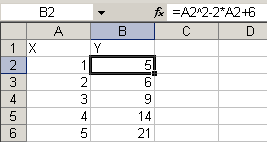
Subsequently, we would base a chart on this set of data:
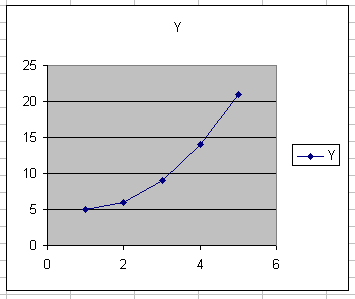
This method lacks flexibility. It would be much more convenient, if we could:
- Enter the (any!) formula into a single cell
- Enter the lower and upper limit of the x-range into two other cells
- Enter the number of values to use for the chart in yet another cell:
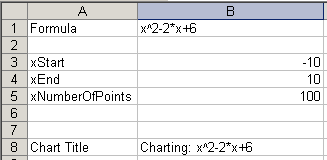
Yet another constraint we're going to place on this task:
Apart from the cells shown in the figure above, no cells are to be used, just defined names with formulas.

Frequently asked Questions
How can I chart a mathematical equation using Excel and defined names?
What is the traditional method to graph an equation like y = x^2 - 2x + 6 in Excel?
Why is the usual method of creating a chart from a formula in Excel considered inflexible?
How can I enter a mathematical formula into Excel to automatically generate a graph?
What parameters do I need to input in Excel to chart a function flexibly?
How can I specify the range of x-values for charting an equation in Excel?
How do defined names help in charting equations in Excel without using extra cells?
What is the benefit of entering the number of values for the chart in a separate cell?
Can I enter any formula into a single cell and have Excel chart it automatically?
What constraints are placed on the cells used when charting equations with defined names in Excel?