downloads for Microsoft® Access®
Donations
The files
Unless stated otherwise, the downloads listed on this page are free of charge.
Use at your own risk.
Back-end Backup Tool
backuptool.zip (Build 004, 03 Feb 2010, 77k, Downloaded: 2181 times)Do you have one or more split Access database systems which are permanently in use? Then you probably know you can't just copy their back-end files to create a backup of them as the copies might become corrupt. This database tool allows you to make scheduled backups for an unlimited amount of Access databases. The tool keeps three backup copies of each database it backs up.
Updated to build 004:
- Also copies the relationships to the backup copy.
- Skips linked tables
Credits: Thanks to Paul Connolly for adding the relationships code.
Works for Access 2000, XP, 2003 and 2007.

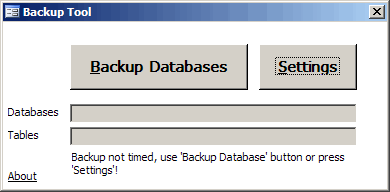
Progress window of backup tool.

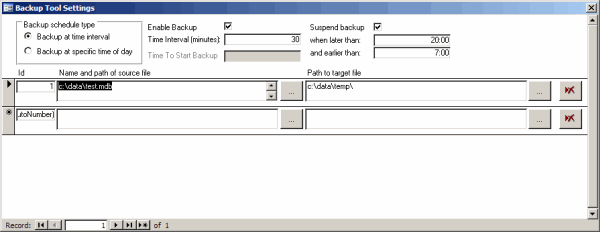
Settings window of backup tool
Click here to request support or issue comments or suggestions on this product.
Microsoft and the Office logo are trademarks or registered trademarks of Microsoft Corporation in the United States and/or other countries.


Comments
Showing last 8 comments of 38 in total (Show All Comments):Comment by: Bernard (6/18/2010 11:44:38 PM)Re your Access Backup tool (v4) ... nice idea, thank you for sharing. Just a couple of comments: first, it fails badly if the source file doesn't exist at the time the backup runs (if its been moved, for example) - in fact if I click "Cancel" on the dialog box that comes up then Access hangs completely. The fix is to extend the first IF test in ExportTables so that it explicitly tests for the file existing.
Possibly related to the way it failed: surely the second block of "Relations" code (three Calls) is in the wrong place? Should it not be inside the IF ... otherwise if the IF fails, the WriteRelationships function will be called when the SaveRelationships hasn't been.
Incidentally, I wanted to incorporate the code inside an existing Access program, so that it regularly backs up its own backend tables. This seems to work well - I just adapted frmBackupTables so that it is started from my startup routine and hidden ... then unhidden when you need it.
Can you think of any issues that are likely to arise from using it in this way? It seems to be working so far.
BTW - I've also added another option in the Settings to control how many backups are kept, rather than just fixing on 3, this works nicely.
Finally, I'm still something of a novice at this but I was puzzled by the slightly complicated way you handle the settings part of frmSettings, with all that code reading from the table to start with and then saving at the end. Would it not have been easier to create another form bound to tblSettings and then include that as a Subform on frmSettings?
Thanks again for sharing the code!
Comment by: Jan Karel Pieterse (6/20/2010 10:34:03 PM)Hi Bernard,
Thanks for a load of valuable comments!
I can't think of a problem having the code inside the frontend application, apart from that it will make it stop responding for "real" work as long as it is doing the backup. When run from a separate Access instance, you can still work with the frontend (albeit that it will be slow when a backup runs).
I can't recall why I built the settings form like this, must have had a good reason :-)
Comment by: Jan Karel Pieterse (6/20/2010 10:39:56 PM)Hi Bernard,
On the relationships code:
The first call stores the relationships of the source database in a table.
The second set of calls does this:
- Restore the relationships from the table to the copied database
- remove the relationships tables from both source and copy database.
Comment by: Julie (7/13/2010 9:08:10 AM)Just wanted to say that your tool is great. Thank you sooooo much for posting it :)
Comment by: Reid (8/2/2010 10:15:45 AM)When I choose my source file it says "Run time error'3326': This Recordset is not updateable"
Is there something I am doing wrong?
Comment by: Jan Karel Pieterse (8/16/2010 3:26:02 AM)Hi Reid,
Not sure what might be causing this. Maybe you do not have the proper rights to the database?
Comment by: Pavlos (8/31/2010 8:33:05 AM)Congratulations for the tool, it's absolutely fanstasic! However, I would like to ask if we can have a lighter version of it, without the setting options. When the tool is opened the user to be asked for the desired folder to save the back-end. That's all!
Regarding the path of the (only one) current back-end it can be retrived automatically by the linked tables, or not?
regards
Comment by: Jan Karel Pieterse (9/1/2010 12:50:11 AM)Hi Pavlos,
Unfortunately, I have no time to create custom versions of this tool, other than by doing that commercially.
Of course you are welcome to modify the tool for your own needs and make the changes as required.
You can contact me to negotiate rates and conditions should you need assistance in making the needed modifications.
Have a question, comment or suggestion? Then please use this form.
If your question is not directly related to this web page, but rather a more general "How do I do this" Excel question, then I advise you to ask your question here: www.eileenslounge.com.