
RefTreeAnalyser Quick Operating instructions
Pages in this article
- Why RefTreeAnalyser?
- Screenshots of RefTreeAnalyser
- Version information
- Quick Operating instructions
- Full help
Download
You can use this button to download the add-in. Try it for free!
Instructions
- Right-click the downloaded zip file, choose Properties. Check the "Unblock" box
- Unpack the zip file to any folder you like.
- Navigate to that folder
- Open the file called "RefTreeAnalyserXL.xlam".
- Follow instructions to install.
After installation you will find a new tab on the ribbon of Excel called RefTreeAnalyser. You will find all options there:

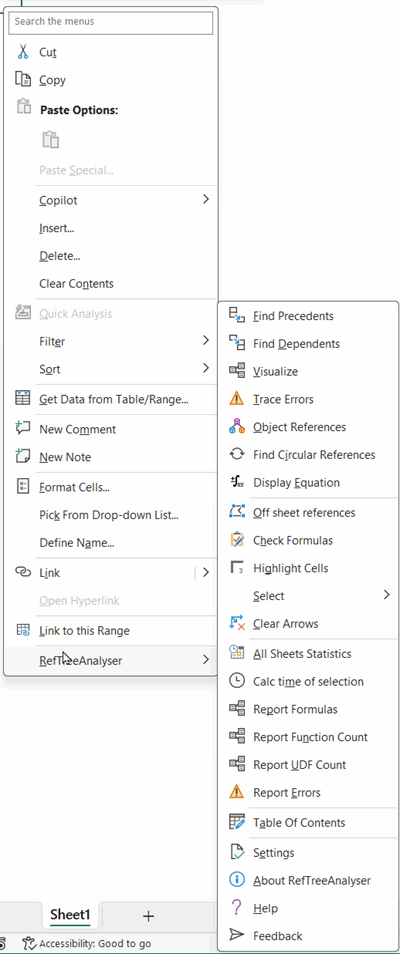
You can also use the cell right click menu to access most features:
Buy now (Paypal and credit cards supported)


Frequently asked Questions
Where can I download the most recent version of RefTreeAnalyser?
How do I unblock the RefTreeAnalyser zip file after downloading?
What are the steps to install RefTreeAnalyser after unpacking the zip file?
Where do I find the RefTreeAnalyserXL.xlam file?
How do I start the RefTreeAnalyser tool in Excel?
What does the RefTreeAnalyser ribbon tab look like in Excel?
Is there a right-click menu option for RefTreeAnalyser in Excel?
What should I do after opening the RefTreeAnalyserXL.xlam file?
Can I install RefTreeAnalyser in any folder on my computer?
Where can I find comments or feedback about RefTreeAnalyser?
Comments