
Excel File Remediation Tool, Repair Corrupt Spreadsheets Fast
The add-in you need when your workbook is slow or behaves unpredictable!
Try the Free DemoKey features
Save hours of manual clean-up and keep your business-critical spreadsheets safe and sound.
 Clean Bloated
Formatting
Clean Bloated
Formatting
Remove excessive styles, unused cells, and legacy formatting that slow down workbook performance.
 Fix Broken Named Ranges
Detect and remove corrupt or orphaned named ranges that cause calculation errors and instability.
 Optimize Calculation Speed
Reset volatile formulas and used ranges to restore fast, predictable workbook behavior.
 Preserve
VBA & Formatting
Preserve
VBA & Formatting
Safely clean files without touching your macros, formulas, or layout—no data loss, no surprises.
 Remove Hidden Junk
Strip out phantom links, and invisible content that break your workbook and cause crashes.
 Wizard-Based Repair
Step-by-step interface guides you through file selection, cleanup options, and progress tracking—no guesswork.
Content
- introduction
- Common Excel File Issues & How This Tool Helps
- Download
- Purchase
- Money back guarantee
- User interface
Introduction
Many companies have been using spreadsheets for decades. Sometimes spreadsheet models may go back as much as 20 years, when the first steps were taken to build them, sometimes using Lotus 123 or other spreadsheet applications.
Common Excel File Issues & How This Tool Helps
Sometimes a model starts showing problems:
- It takes forever to open your file
- Excel regularly crashes when working with your file
- Bloated formatting
- Unused ranges
- Laggy performance due to corrupted names
This tool helps you to clean your files by fixing all sorts of problems in your files:
- Unused custom cell styles
- Problematic range names
- Large used ranges on worksheets
- Range name left-overs from other add-ins such as FactSet and Cap IQ (there may be thousands of them in your file!)
- Range names with errors or with external references
- Many tiny (invisible even) objects on your worksheet
Download
Use the link below to download the tool for free. Please read this article if the tool does not appear to work: Excel add-ins fail to load
Download The Remediation Utility (Free demo!!!) V2.0 Build 144, Updated Mar 16, 2026.
The tool will work without a license code but with (only slightly) limited functionality. After purchasing a license, you can simply enter the license code into the tool's settings dialog. The limitations will be removed instantly.
Purchase
Buy now (Paypal and credit cards supported)
A single user license costs € 80 (about $ 90) excluding VAT.
Money back guarantee
If you are in any way dissatisfied with The Excel File Remediation Utility , contact me within 30 days after your purchase and I'll issue a refund.
User interface
The menu of the tool is shown below.

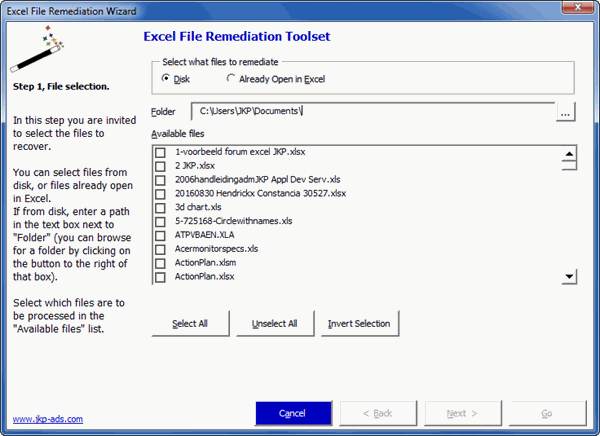
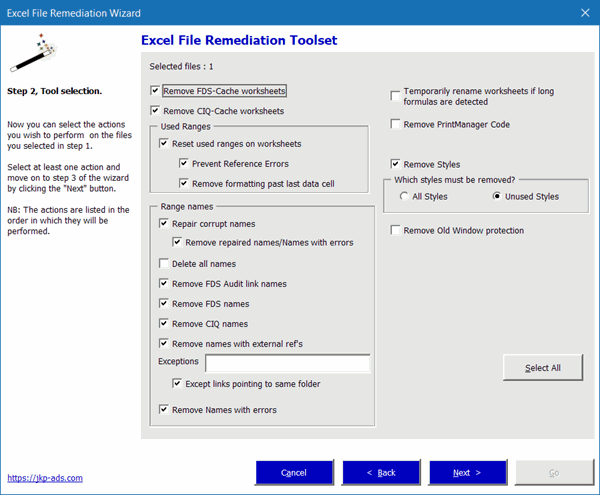
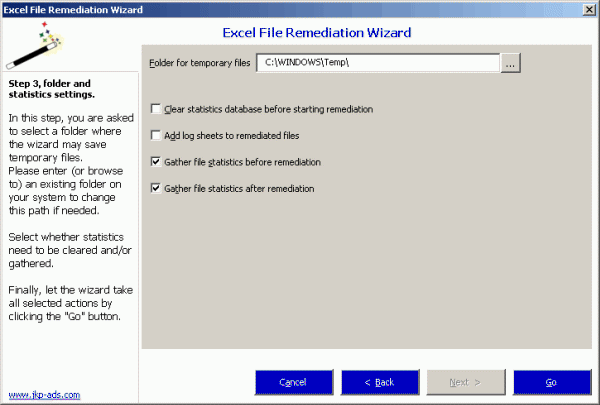
These screenshots show the steps of the wizard.
First Step: file selection.
Next step: what actions must be performed:
Last step: What statistics must be gathered:
Buy now (Paypal and credit cards supported)
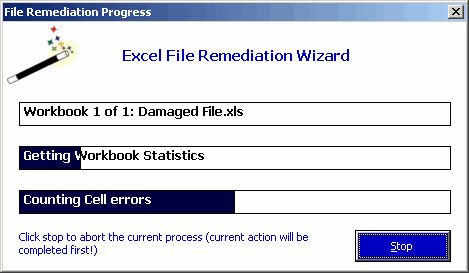
Since remediation may be a lengthy process, the tools shows its progress. Note that the progress indicator has a stop button, with which the process may be exited.
My customer has repeatedly confirmed this tool has proven to be an invaluable time-saver, which has enabled them to salvage business critical files, they otherwise had to consider as being lost.
Buy now (Paypal and credit cards supported)
Frequently asked Questions
What is the Excel File Remediation Tool used for?
What common issues can occur in long-used spreadsheet models?
What was the customer's request regarding the remediation tool?
How much does a single user license for the tool cost?
Where can I download the Excel File Remediation Utility?
Does the tool have a demo or limited functionality version?
Is there a money back guarantee for the tool?
What does the user interface of the remediation tool look like?
What steps are involved in using the remediation tool wizard?
Comments