Downloads
Acknowledgements
Some of the files on this page are also available at Stephen Bullen's website.
Excel versions
These files should all work in Excel 97, 2000, XP, 2003, 2007, 2010 and 2013, unless stated otherwise. For some downloads a dedicated version for Excel 2007/2010/2013 is available.
Donations
The files
| Name of download | Description and download link |
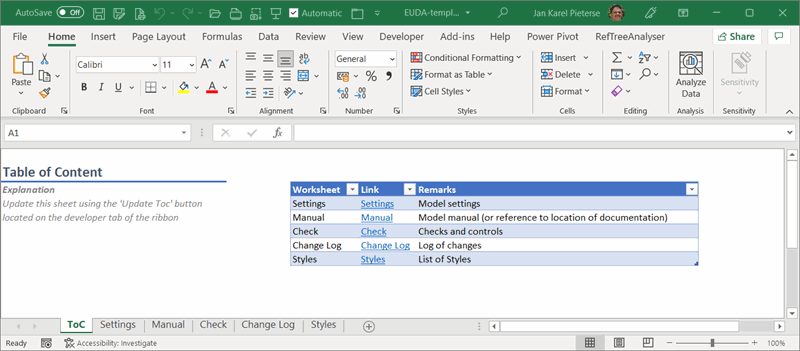
RefTreeAnalyser |
Ever had to work out the logic of other people's Excel files? Ever had to untie the spaghetti-knots of a large Excel workbook's formulas? Then you know what a nightmare this can be! Now there is the RefTreeAnalyser! |
Name Manager |
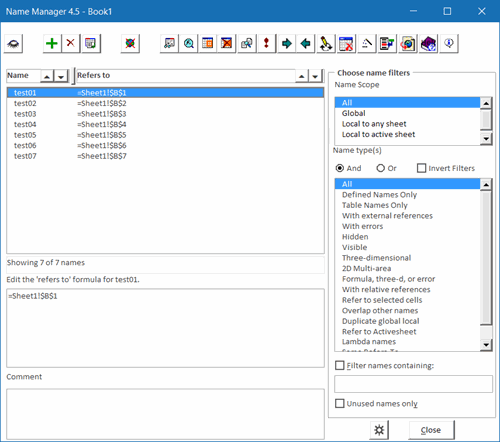
The Name Manager An excellent utility to manage defined names in your workbooks. |
FlexFind |
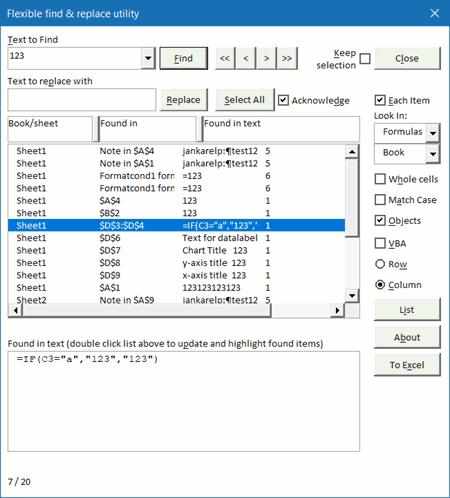
Flexfind eases searching and replacing throughout an entire workbook. Also enables you to search and replace strings in objects such as headers and footers, chart titles, buttons and many, many more. |
Autosafe |
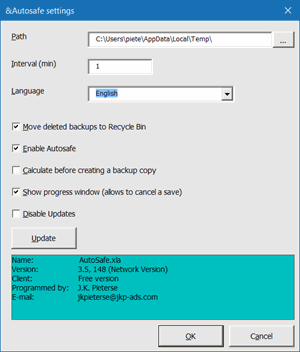
Autosafe.zip (Build 135, 29 Jan 2013, downloaded: 38659 times) New in Autosafe: You can now turn off the update function. Version 3.5 of Autosafe enables use in environments with long paths/filenames. The standard Autosave (note the spelling) utility that ships with Excel just saves workbooks at a set interval, overwriting the file on disk. This is not very convenient if you planned to leave the master file intact and save the changed workbook using a different filename. It also does nothing to simplify recovery of unsaved/changed documents after a system crash. This Autosafe utility creates copies of open workbooks at regular intervals in a separate (user-selectable) directory. It does not overwrite the master file(s), that is up to the user to do, using normal methods. As soon as a workbook is closed the backup copy is deleted from the backup directory. If an abnormal termination of Excel occurs, the backup copies remain on disk, and Autosafe finds them the next time Excel is started and presents recovery options to the user. Autosafe comes with an autoupdate function which checks for updates every week. Includes the following languages: English, Dansk, Deutsch, Español, Français, Indonesia, Italiano, Nederlands, Norsk, Hrvatski, Slovenščina, Korean, Русский (Russian), Lithuanian and Hungarian. The previous version is still available: Autosafe34.zip (13 January 2003, 228k, downloaded: 5389 times) Note that this one shows a nag screen on networked computers. Autosafe does not work on a Mac. |
GoBack |
GoBack.zip (8 February 2005, downloaded: 8274 times)
Version 1.0 build 003.
Sometimes one has to edit a large workbook, with many worksheets. This tiny utility keeps a record of the ranges you have visited and gives you the opportunity to return to previous selections using two hot keys: control-alt-p to go to a previous selection and control-alt-n to go to the next. It also creates a toolbar with a dropdown to select a previous selection and to disable/enable the utility. |
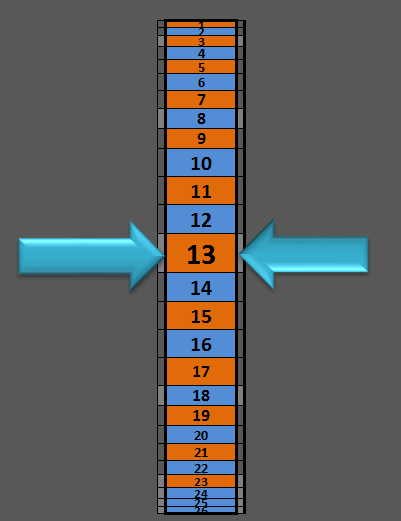
FollowCellPointer |
FollowCellPointer.zip (12 September 2010, downloaded: 6880 times)
Version 1.0 build 007.
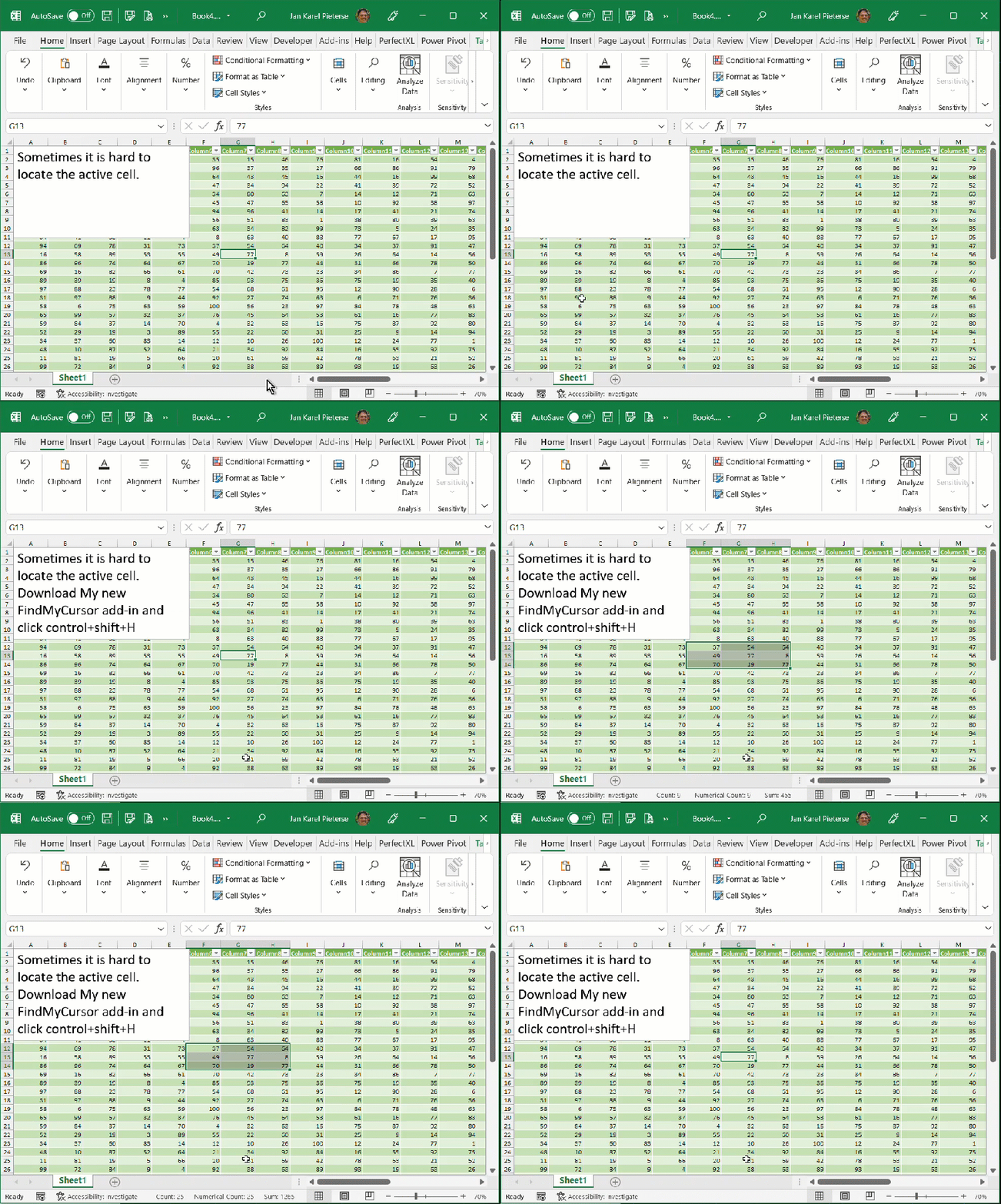
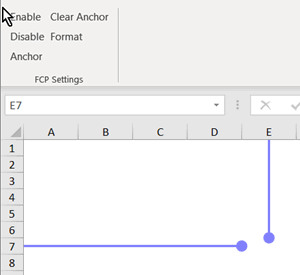
A small tool which follows your cell pointer by placing two arrows on top of your sheet pointing to the active cell. Does not change your formatting. |
HeaderFooter |
HeaderFooter.zip (28 January 2008, downloaded: 8744 times) Version 1.0 build 006. Managing headers and footers in Excel can be a drag. This little tool helps you to change headers and footers in your files easily by means of a toolbar that shows dropdown/edit boxes in which you can type the header/footer codes directly or select them from the list of currently present header/footer codes in your file. |
SetupUtility |
SetupUtility.zip (Updated May 5, 2008, downloaded: 10800 times) If you have created a nice add-in (see this article how to do that), a setup utility is an easy way for your users to install your addin. This free utility just needs you to change 4 cells to roll your own setup file. Update: Now automatically removes invalid addins from addin list (courtesy: http://tinyurl.co.uk/zde9). |
UpdateAnAddin |
UpdateAnAddin.xls (Updated February 19, 2007, downloaded: 11269 times) If you have created a nice add-in (see this article how to do that), an updating mechanism is an easy way to ensure your users get any bugfixes you did automatically . This download demonstrates how you can implement this functionality in your addin. |
ShowTableOnUserform |
ShowTableOnUserform.zip (14 May 2008, downloaded: 6133 times) For a project I needed a quick way to display the content of an array to the user. I didn't want to use a worksheet, but opted for a userform. The data I wanted to show was contained in an array. So I figured I'd put a listbox on a userform and make sure the column widths of the listbox resize with the data I want shown. That proved far from easy... See this article on how it works. |
FixLinks2UDF |
FixLinks2UDF.zip (02 June 2008, downloaded: 3522 times) A demo file that handles #Name! errors for workbooks that use UDFs that reside in an add-in. See this article on how that works. |
QueryManager |
QueryManager.zip (Build 017, 23 September 2010, downloaded: 11331 times) This utility has been developed together with Dick Kusleika. It eases the editing of queries and Pivottable connections. One can: 1. Edit the SQL string and the connect string of queries and PivotCaches 2. Add parameters 3. Change the path to the data source All in a single dialog. |
AutosafeVBE |
AutosafeVBE.zip (build 026, 6 Aug 2007, 260k, downloaded: 15555 times) This utility makes backup copies of VBA components to a user-defined directory. It keeps a user selectable number of copies of each component. It thus keeps a number of generations of your code as your work progresses, enabling you to return to a previous copy when things go wrong. Because it just exports the VBA components, it is unobtrusive because this process is relatively fast compared to saving your workbook or document. Excel and Word version included!! |
Non linear Least Squares |
nonlinearls.zip (12 Apr 2012, downloaded: 2503 times) Fit complex functions like y=exp(a.x).sin(x) + b to data using Least squares |
ExcelVBEMultilineSR |
ExcelVBEMultilineSR.zip (Version 1.0, Build 004, 27 Nov 2008, 634k, downloaded: 5255 times) This utility enables you to do Search and Replace operations
in the Visual Basic Editor of Excel. What is special about this
tool is that you can search for multiple lines of code and replace
with multiple lines of code. |
CopyVBAProject |
CopyVBAProject.zip (Version 1.0, Build 007, 05 Oct 2007, 56k, downloaded: 5568 times) This utility enables you to copy the components from the VBAProject
of workbook A to Workbook B |
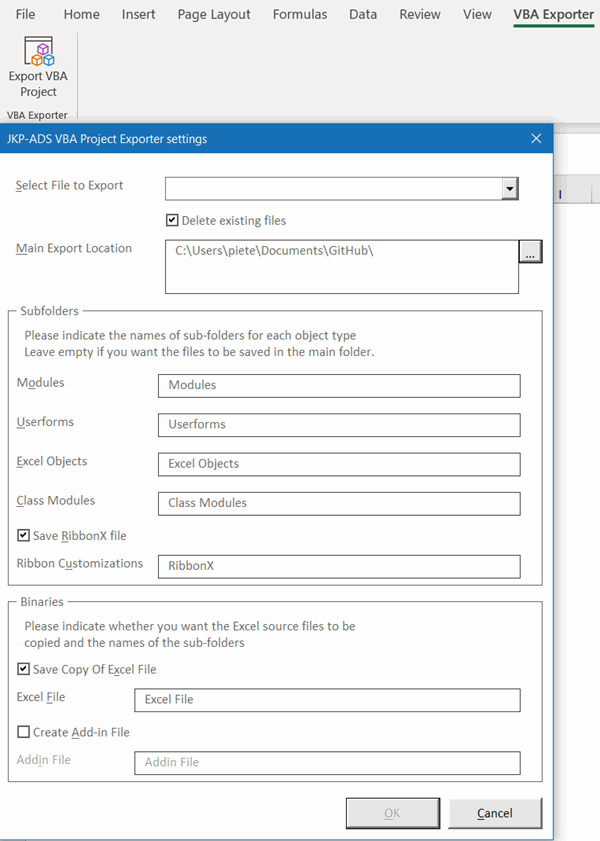
ExportVBAProject |
ExportVBAProject.zip (Version 1.0, Build 001, 14 Oct 2011, 24k, downloaded: 1601 times) This utility enables you to copy the components from a VBAProject to a single text file. Very useful if you need to compare the VBA code of two Excel files. Use this handy tool to compare differences in the exported files: ExamDiff |
ObjectLister |
Objectlister.zip (Version 1.0, Build 003, 1 October 2008, 56k, downloaded: 8213 times) Lists objects, properties and methods of the selected object and enables you to quickly build code that uses many properties of an object. See the ObjectLister page for more information. |
Treeview |
Treeview.zip (build 023, 16 Apr 2013, downloaded 20 times) An All-VBA (MSforms) treeview control that makes the common controls treeview obsolete. Works in all Office versions as of Office 2000, including 64 bits and MAC office. See the accompanying article: An MSForms (all VBA) treeview |
Treeview (Access mdb) |
TreeviewOnAccessForm.zip (build 017, 18 Apr 2013, downloaded 14 times) An All-VBA (MSforms) treeview control that makes the common controls treeview obsolete. This is the same treeview as mentioned above, this time on an Access form. See the accompanying article: An MSForms (all VBA) treeview |
AutoChrt |
AutoChrt.zip (10 November 2000, 7k, downloaded: 16485 times) Automates the process of creating graphs from database-like datasets, where you need to chart various columns against each other in x-y scatter charts to determine relationships between them. It consists of a sheet where to copy the data into and a sheet that holds the chart and some spinner-buttons to control which data are charted. |
ChartAnEquation |
ChartAnEquation.zip (May 1, 2005, 5K, downloaded: 8935 times) Demonstrates a method to chart a mathematical equation using
just defined names. |
ControlHandler |
ControlHandler.zip (17 June 2005, 26k, downloaded: 7077 times) Demonstrates a method to handle the events for multiple controls on a worksheet using a single class module. See this article for an explanation. |
ControlLister |
ControlLister.zip (1-10-2008, 21k, downloaded: 1089 times) Tool that lists all controls on your userforms on a worksheet. Includes code to rebuild the userforms from the table. Note: does not handle userforms with multipage controls very well! |
CatchPasteDemo |
CatchPasteDemo.zip (17 Dec 2007, 21k, downloaded: 4967 times) Demonstrates how to intercept paste operations in a workbook to prevent users from wrecking your validation. The download contains two workbooks; one for Excel 2003 and earlier, the other for Excel 2007 and 2010. See this article for an explanation. |
UndoHandler |
UndoHandler.zip (8 March 2006, 24k, downloaded: 7236 times) Demonstrates a method to enable the user to undo changes made by your VBA code. See this article for an explanation. |
WatchOtherCell |
WatchOtherCell.zip (18 September 2012, 25k, downloaded: 7101 times) This workbook simplifies looking at data in a sheet with a lot of columns. It shows the value of a cell on the same row in a column one can enter in a textbox. This way you can scroll all over the sheet and always (e.g.) have the value of a cell in column BE in view. Start the watcher by opening the file and using its entry in the Tools menu. |
GetARange |
GetARange.zip (4 May 2006, 26k, downloaded: 9663 times) This workbook demonstrates a bug in the VBA Application.InputBox function as described here. The workbook also contains a userform and sample code to work around that bug. |
EditOpenXML |
EditOpenXML.zip (5 September 2011, 26k, downloaded: 4994 times) Wouldn't it be useful to be able to edit the contents of an Office 2007 OpenXML file from within VBA? Well, now you can using this demo file. Find a full description here. |
ModelessFormOnTop |
ModelessformOnTop.zip (26 November 2012, downloaded: 316 times) Excel 2013 now has a SDI as opposed to the MDI previous Excel versions have. This file demonstrates how to keep a modeless userform on top of the Excel 2013 window. Find a full description here. |
Arg2Name |
Arg2Name.zip (8 February 2001, 10k, downloaded: 14396 times) This workbook demonstrates a trick to pass (range) arguments to defined name formula's. As published in David Hagers' EEE #9, available from John Walkenbach's web site. See the Excel names page. |
xlMenuFunDict |
xlMenuFunDict.zip (29 Jan 2003, 810k, downloaded: 16526 times) International versions of Office have the menu system in their local language. Also the Excel worksheet functions are (mostly) listed in local language. This complicates communication with the users with such a version. To aid in this process a utility has been devised that creates and shows a translation list of the Excel built-in command bars and controls and the Excel worksheet functions. This workbook can also list command bars of other Office software packages. It thus enables the international user who is using a different language version of Excel to quickly find translations for sequences of menu commands and function names. |


Comments
All comments about this page:
Comment by: Hugh Curran (4/29/2006 3:27:38 AM)Hi guys
Thanks for a great page. I was tairing my hair out trying to translate a GET.DOCUMENT command to Dutch and your FunDict solved the problem. Many thanks
Comment by: ainivip (5/7/2006 4:42:52 AM)Thanks alot.
Comment by: Shahbaz Iqbal (5/29/2006 9:53:04 PM)Hi, I must admit that I really like your Flexfind utility. It has saved me a lot of time, and my skin too (Smile). I am not VBA techie but here is a little proposal regarding this utility. It would be really exciting if Flexfind could find text from closed files in a directory. I and many others are looking forward to it. All my best wishes are with you. Thanks you very much.
Regards.
Comment by: Jan Karel Pieterse (5/30/2006 1:01:59 AM)Hi Shahbaz,
Thanks for your comments. About finding text in closed files: Excel already has that capability (the way to get there differs from version to version). In Excel XP, choose File, Open and click the "Tools" button and select "Search".
In the subsequent screen enter your search criteria and off you go!
Comment by: Shahbaz Iqbal (6/9/2006 3:12:01 AM)Hi Pieterse,
Sorry for not explianing enough about my wish. So here it goes. Your utlity "Flexfind" does a fantastic job of listing all found values in another workbook. But for that the workbooks need to open to search for text and subsequently listing those found records. Excel's search is limited and also not powerful enough and besides it doesn't allow to put found records in a list. I believe there are VBA macros which could do that, i think.
Thanks for your reply. I request Microsoft to please add this utility in their 2007 release and please appreciate the hard work of author by paying for it this time around.
Have a wonderful time.
Comment by: SIVAREDDY (7/12/2006 3:06:17 AM)Thanks for your autosafe.
Comment by: Mike King (10/31/2006 10:57:51 PM)Name Manager is fantastic!! About 1000 times better than excel's handling of defined names.
Comment by: Jan Karel Pieterse (11/1/2006 4:09:46 AM)Thanks Mike, much appreciated!
Comment by: Claus Coman (11/3/2006 10:34:07 AM)I will spread this disease [Excel] among the people I like to work with.
Comment by: Fareed Ajmal (11/4/2006 5:27:17 AM)Hi
I find it Easie tha any other Software
Thanks
Partner
Comment by: Rae Vino (11/17/2006 12:23:49 AM)Thanks for your excellent flexifind. I was searching for an utility like this for a week. Im using excel 2000 which dont has a good find all interface like this. But excel 2003 has an interface like your free utility.The nice thing is free for all.
Comment by: Dan R. (1/3/2007 10:46:45 AM)Hiya,
For some reason, the Autosafe add-in keeps giving a pop-up on open saying it is the testing version. Is there a non-testing version without the pop-up?
Thanks!
-Dan
Comment by: Jan Karel Pieterse (1/3/2007 10:49:17 AM)Hi Dan,
Yes, the 35 beta version is network enabled and doesn't have the nag screen.
Comment by: kanwaljit (1/9/2007 1:49:17 AM)Hi Jan,
I have downloaded the new build (the link indicator still shows the build number as 577). But don't know how to make it compatible with present version of Fast Excel. Any ideas ?
Regards
Kanwaljit
Comment by: Jan Karel Pieterse (1/9/2007 3:12:28 AM)Hi Kanwaljit,
Contact Charles Williams for information on updating FastExcel:
<a href="http://www.decisionmodels.com">www.decisionmodels.com</a>
Comment by: Vivek (4/19/2007 8:03:13 AM)Hi Jan,
You rock !
Your addins are really wonderful pieces of code.
I especially like & use AutoSafe, FlexFind and Name Manager a lot.
I started using Excel 2007 recently,
so I'll let you know if there are any incompatibilities.
Thanks for your excellent efforts.
All the best.
Regards,
Vivek.
Comment by: Jan Karel Pieterse (4/19/2007 10:38:55 AM)Hi Vivek,
Gee, thanks for your compliments!
Jan Karel
Comment by: Narsi (4/26/2007 3:52:38 PM)Thanks for your excellent work on Name Manager. I saved a lot of time in finding and deleting 1000s (yes thousands) of orphaned range names.
Regards
Narsi
Comment by: Frits (6/15/2007 1:26:04 PM)Al weer een flink tijdje geleden werkte autosafe door veranderde netwerkbevoegdheden niet meer. Ik kreeg snel een goed antwoord waar het probleem zat en de toezegging dat het wordt opgelost, maar even zou kunnen duren. Inmiddels is het bestand geupdated en werkt weer voortreffelijk !! (heeft z´n nut na vastlopen al weer bewezen)
Dank voor updaten, maar vooral ook voor snel antwoorden en nakomen toezeggingen.
Fantastisch !!!
Comment by: Jan Karel Pieterse (6/17/2007 2:56:41 AM)Hallo Frits,
Bedankt en graag gedaan!
Jan Karel
Comment by: Pradeep (6/19/2007 8:53:47 PM)i want to use this utility.
Comment by: Jan Karel Pieterse (6/19/2007 11:59:14 PM)Hi Pradeep,
You did not say what utility?
You can download and use all tools on these pages for free.
Comment by: Jim (6/26/2007 1:30:46 PM)I've been missing Autosafe ever since upgrading to Excel 2007 - I'm eagerly awaiting a new version which works with 2007 :-)
Comment by: Jan Karel Pieterse (6/27/2007 12:42:50 AM)Hi Jim,
Are you saying it does not work as expected in 2007?
Comment by: Roger (6/27/2007 2:56:19 PM)How do you run this macro? CopyVBAProject.zip
I've added it in using the Add-in menu and I can see it in the VBA Project explorer but I can't find a way to run it.
Comment by: Jan Karel Pieterse (6/28/2007 2:39:21 AM)Hi Roger,
Look in the Tools menu...
Comment by: Dominique van Est (7/20/2007 2:09:28 PM)Should have know this prog (autosafe) 3 days ago :(
Thanks :)
Comment by: Pankaj Madgaonkar (8/24/2007 2:58:47 AM)Hi Team,
This is an excellent utility for all the people who are not so conversant with VBA or advanced excel utilities. Amazing pack... Appreciations for the good work...
Pankaj
Comment by: Ian (9/22/2007 8:30:04 AM)Been using autosafe for years.
Would love a word version!
Comment by: Jan Karel Pieterse (9/23/2007 9:04:59 PM)Hi Ian,
Thanks for the suggestion!
Comment by: srinivas (9/28/2007 10:36:04 PM)hi,
iam write code for download excel sheet in asp..
after download that sheet shows empty..
can u tell me reasons
Comment by: Jan Karel Pieterse (9/30/2007 10:31:28 AM)Hi srinivas,
No, I'm sorry I am no ASP expert. Have a go at one of the newsgroups mentioned on my links page.
Comment by: Graham (11/16/2007 4:04:50 AM)It looks like you have some really great tools here - I'm looking forward to trying some of them.
One that I can't see which I would dearly love is a 'target total' function. For example, you have a long column of data, perhaps an extract from bank statements, which totals say £200,000. You know that a number of the items adds up to an exact number, say £12,360.45. I would like a function that would be able to show me all the combinations of rows that would total to £12,360.45. I appreciate that there may be several, so presentation of the results may be tricky.
This would be a really useful tool for accountants and bookkeepers. It would also have applications in law enforcement for tracing a sum coming in to a bank account that is then broken down into smaller parts before being paid out.
Hope you can help!
Graham
Comment by: Jan Karel Pieterse (11/16/2007 5:32:06 AM)Hi Graham,
Thanks for your suggestion, much appreciated.
Comment by: Debra McLaren (12/18/2007 12:31:31 AM)The catch paste download link is broken.
Comment by: Jan Karel Pieterse (12/18/2007 2:56:38 AM)Hi Debra,
Thanks!
Fixed now.
Comment by: Fred (1/27/2008 12:37:06 PM)Hi Jan Karel,
I think you said some time ago that you did not do much with your Header/Footer manager. That's too bad! I see it's not even listed on your web site. I have a copy from 2004.
I discovered a bug: when there are no work books open and you open a new or existing one, I'm getting the following error:
method 'ListIndex' of object 'CommandBarComboBox' failed
Only thing that works is to close Excel entirely and re-open it. You can work in Excel but the toolbars are grayed out.
If you're so inclined to fix the bug, that would be great. Also 2 suggesions for enhancements:
1. a form (for which I can get a button on my toolbar - not sure how to do) that provides a checkbox for each of the header and footer managers so I can decide what I want open when. I know they're under the Toolbars but that's buried. This would be better if it had a section with all the & abbrevs because the alternative is to go into Excel's header/footer area and click on each to see what it is - ie click the calendar to see &D for date.
2. Would love to be able to be able to take the info for the header or footer from a cell. Maybe a sheet with a special name where cols A,B,C correspond to the left, center, right items or something like the formula box capability to "shrink" the box and click on a cell that is then used in the formula.
Anyway, I know that these probably won't happen. And I can train myself to avoid the bug. Just some thoughts.
Thanks.
Fred
Comment by: Jan Karel Pieterse (1/28/2008 1:29:59 AM)Hi Fred,
I've updated the tool and listed it here!
Comment by: Tatiana (1/31/2008 2:04:58 AM)Hello, I will like to have the number of pages and the page im in w/o putting it myself manually, and I dont want it to be in the Head or Foot of the Excel worksheet, i want it to be where i decide to put it. Can you help me? I saw your answer in a Forum with the PageOfPages, but I got no idea how to use it. Sorry kinda nul for pcs.
thanks for ya help!
tatiana
Comment by: Jan Karel Pieterse (2/3/2008 10:20:50 PM)Hi Tatiana,
I've sent you a sample file.
Comment by: Philip (5/15/2008 4:15:26 AM)Hi,
brilliant collection of utilities. Thank you.
I am having a problem with the AutoSafe.xla (in MS Excel 2003). Everytime it tries
to run I get an error message like 'C:\temp\Autosafe VBE.xla!ExportThem' cannot be
found.
The strange thing is that the add-in is installed in the correct place, so how do I
fix this behavior.
thanks
Philip
Comment by: Jan Karel Pieterse (5/15/2008 4:25:58 AM)Hi Philip,
Odd, AutosafeVBE works fine for me.
Could you please download a fresh copy from my site, uninstall the old one and
install the new one?
Comment by: james grimes (5/22/2008 6:21:17 AM)How do I add autosafe to trusted publishers in excel 2007. I know where "trusted
pubs" is, I just don't know how to add to it. Thanks
Comment by: Jan Karel Pieterse (5/22/2008 10:15:03 AM)Hi James,
You should not have to add autosafe to your trusted publishers, if you install it,
it is supposed to be placed in a trusted location.
You can however open the addin file itself directly (Office button, open). Then you
should get an enable macros screen that should have a checkbox to trust code from
this publisher.
Comment by: james grimes (5/22/2008 3:58:29 PM)Hi Jan,
Thanks for your prompt response. I did get autosafe installed properly & it has
saved my bacon! Excel 2007, which I just installed on my main office computer, was
locking up every hour on the hour. I noticed that every time it crashed, it was
attempting an auto-recover. Then I remembered autosafe, which I had put on another
computer about a year ago, just to see how it worked. Since installing autosafe, (&
dis-abling auto-recover), on the office computer, no problems at all. What a
lifesaver.
Comment by: Markus (6/11/2008 2:25:38 PM)Hi Jan,
great thanks for Autosafe that saved me many hours of work! On my new PC however,
which has no C: drive (during installation of WinXP the built in card reader hijacked
the drive letters from C: on, so the system partition is H:) it gives an error
message that some file cannot be found. This is caused by some references to C:\ in
your code. Not longer a problem for me as I could fix it but maybe for others...
Comment by: John (7/7/2008 7:04:45 AM)Will AutoSafe help in this scenario? I have an open sheet for several days,
without any manual saves, I know not very smart. I open another from an email,
ect. ect. and when I closed it I mistakenly answer "no" thinking its the page I've
just opened and it closes all my files, all changed made in past few days are
gone. I'm looking for a scheduled auto save where it would save as last known
good, just one save from original?
Comment by: Sandeep (7/31/2008 1:50:41 PM)Hi Jan.
I use an addin called CWBTXLA to download and upload data from as400 server. Now I
am working on a new machine and installed the addin. It is craching the excel
whenever I tries to connect to As400. I think someone else might have asked you
same question, as this utility has been used by lot many people. Please let me know
if you have found a fix to work it correctly.
Comment by: Jan Karel Pieterse (8/6/2008 10:54:02 AM)Hi Sandeep,
Which addin please?
Comment by: Jan Karel Pieterse (8/6/2008 11:02:48 AM)Hi John,
Yes, Autosafe will help in that scenario, since you will find backup copies of the
edited file in your recycle bin, from which you can restore the last one. This will
be picked up by Autosafe.
Comment by: SANDEEP GAUR (8/19/2008 3:39:33 PM)Hi Jan,
I am sorry, as I missed to check the updates.
The addin which is creating problem for me is CWBTFXLA. It gets installed when
client access is being installed. I referred from location where this addin is
available in IBM/Client access folder. I have recentely got Office 2007 installed
on my machine. It appears this addin is not accepted by 2003 and 2007 as a valid
addin.
Regards,
Sandee[
Comment by: javier gonzalez (9/5/2008 7:36:21 PM)congratulations Jan!
for your interest in publicizing a method to graph in a simple rectangular system
in any capacity, whether this method can be applied to the polar system?
The assessment formula may lead to evaluate algebraic equations? say factoring or
derivative? beste regards
friendly shake hands!!!!
javier gonzalez
from Fresnillo, Mexico
Comment by: Jan Karel Pieterse (9/8/2008 12:49:13 AM)Hi Javier,
You could create a polar chart this way, but I think you have to do a conversion
from polar to semi-x-y values Excel can plot. No doubt you can find information on
this if you google for polar plotting with Excel.
Comment by: Eric DeSouza (9/8/2008 9:07:31 PM)For the people want the old autosave of office 97/2000, there is "autosave.xla"
aka "autosave.xls" that you can get to work in a newer version of office. Simply
get an old office disk 97/2000 version, and take the single autosave.xla file. Go
to Excel -> Tools -> Addins and then browse to the file autosave.xla. Only
downside, you cannot change the default of 10 minutes of autosaving. The addin is
password protected by Microsoft and cannot be altered in VBA.
Comment by: Govert Vissers (11/4/2008 8:43:52 AM)Hi Jan Karel,
I just love The Name Manager add-in!
It's a real timesaver.
I also use JMT utilities a lot.
Thanks for sharing all those great excel-gems.
Govert Vissers
Comment by: Jan Karel Pieterse (11/4/2008 10:17:02 AM)Hi Govert,
Thanks!
Comment by: Egon (11/5/2008 1:38:05 PM)Hi Sandeep,
I find the AS400 (iSeries) utilities quite frustrating myself - they're pretty buggy. If there are nulls in your data table, that might be the issue.
If so, try some ADODB instead: http://support.microsoft.com/default.aspx?scid=kb;en-us;146405
Comment by: Randy (1/28/2009 5:50:02 AM)Hi Jan, Great product- I've successfully removed several hundred strange names/names with bad invalid REFs from a workbook. However now when I close the file it crashes excel every time. Note that I can work/save changes in the file and it only crashes upon exiting Excel. Have you heard of this or seen this before?
Comment by: FARAZ AHMED QURESHI (3/8/2009 2:23:15 PM)An excellent site Jan! However, could you solve or guide me in the following query?
Excel 2007 sure does provide a good feature of auto completion in case of entering a built-in function so as to select one from the recommended list instead of typing the whole. However, the UDFs I have defined in an AddIn are not being presented so.
Any idea to overcome this and have your UDFs be listed as well?
Thanx in advance
Comment by: Jan Karel Pieterse (3/9/2009 12:22:52 AM)Hi Faraz,
It seems to work OK for me (the function is shown in the autocomplete list, but not the arguments).
Comment by: Pankaj Rayal (3/26/2009 11:19:51 PM)I would like thank you for these examples. i learned a lot of them. Excellent job
I hope in future you will inform us about your new research.
Once again very very thanks and regards.
Your
Pankaj Rayal
pankaj_rayal@hotmail.com
Comment by: Karen Chew (4/10/2009 12:33:31 AM)Your add in are great - thanks
Comment by: LJ (4/13/2009 10:32:38 PM)Hi Jan,
I have a query that probably you can help me as I saw many sites that has your name in it. I had encountered similar problems like the others regarding UNREADABLE CONTENT error.
""Excel unable to open the file by repairing or removing the unreadable
content.
-Removed records: styles from /xl/styles.xml part (styles)
Repaired records: format from /xl/styles.xml part (stlyes)"
However, I cannot forward the file as it is very confidential. Is there a software or twicks that i need to have to be able to repair the problem? I validated that the values and data are correct its just that the formatting and styles are gone. I need a fix for this as i need to present this workbook to management and its very rubbish to present it in simple formats and no styles at all. Hope you can help.
Comment by: Jan Karel Pieterse (4/14/2009 1:32:22 AM)Hi LJ,
If you like you can send the file to me, I'll have a quick look.
Comment by: Brian (4/21/2009 4:02:34 PM)Have you found anything out about LJ's problem? I'm having the same issue.
Comment by: Jan Karel Pieterse (4/21/2009 9:22:51 PM)Hi Brian,
No, LJ hasn't responded. You can send the file if you like though.
Comment by: Abdul Qayyum (6/12/2009 2:57:18 AM)Sir
I want to an attendance reqister which sandwitch the rest day if the absent occur before and after the rest day means if a occure before and after r then the r count as a
please help me in this mater i will be thank ful to u
Thanks
Abdul Qayyum
Comment by: Jan Karel Pieterse (6/12/2009 4:55:35 AM)Hi Abdul,
Of course I can develop something for you commercially. Please send me an email using the email address at the bottom of this page.
Comment by: Jim (6/17/2009 7:48:12 PM)I love Autosafe - it makes file recovery so much easier :-). But it has one nasty side-effect: whenever it runs, Excel's undo list clears. I count on being able to undo actions, but now never know when I'll be unable to do this. Is there any workaround to avoid this behavior?
Thanks!
-jim.
Comment by: Jan Karel Pieterse (6/17/2009 9:24:45 PM)Hi Jim,
I know, that is the only real drawback of Autosafe (in fact, of anything that does a save in Excel): it zaps your undo list.
Luckily, as of Excel 2007 the undo list is no longer affected by a save.
Comment by: Jim (6/17/2009 11:19:32 PM)Hmm, I think something else is going on. I'm running Excel 2007 SP2, and indeed, if I manually save a file, the Undo list stays intact. But the moment that Autosafe backs up my files, my Undo lists clear. Any other ideas?
Thanks!
Comment by: Jan Karel Pieterse (6/18/2009 12:11:32 AM)Hi Jim,
Odd indeed, seems the save through the UI does not behave the same as save through VBA.
On my system (2007 sp2) the last undo action is is retained however, so it is slightly better than 2003 and before used to be.
Comment by: Gerald Shaffer (7/30/2009 6:08:24 PM)I do comercial estimating and the program I use (etakeoff) comes with a spreadsheet which I can use to break down walls into the various components. I then copy and drag the contents to excel. The problem I'm having is that when I get the info into excel, I have to manually copy the amount of say type X sheetrock from column a2 to the corresponding column for type x sheetrock. Is there a way create a column which reads a code in the same row as the amount is in and enters or copies that amount in a specified column for type x sheetrock? Would be kinda like " if columm b2=01(code for type x sheetrock) copy amount in columm c2 to column d2(column d would be type x sheetrock) then do the same for the next row, if column b3=02 copy amount in column c3 to column e3 and so on and so on? Any help or suggestions where I might find any info on how to program excel to complete this operation would be greatly appreciated.
Comment by: Jan Karel Pieterse (7/31/2009 6:13:14 AM)Hi Gerald,
You could use a formula in your destination table using VLOOKUP to extract the information from the other table.
Look in Help what the VLOOKUP formula comprises.
Comment by: Richard Kennedy (8/20/2009 5:54:23 AM)Excel version: 2003 (Office 11)
Language: Portuguese (Brazil)
Add-in: Autosafe
Comment: Items copied are lost (wiped from clipboard?) when save of autosafe runs.
Fix: no suggestions at this time.
Add-in: xlMenuFunDict
Comment: Very useful to me (I'm english, working in Brazil)
Comment: ssheetname generated for PowerPoint (Office 11) is too long (> 31 characters)
Possible fix: test length of ssheetname, if too long, replace "Microsoft" in ssheetname by "MS"
Comment: Error during creation of menu lists for PowerPoint, initiated by command button with text "Add menulist of appl in dropdown". Powerpoint is opened, new Excel sheet seems to list items in portuguese successfuly, but no entries in English. Powerpoint crashes. VBA stops at code line
Fix: no suggestions at this time.
Sincerely,
Richard.
Comment by: Pleased (9/2/2009 2:37:12 AM)After losing days of work, Autosafe is a great utility, thanks for helping computers to make our lives easier...
Comment by: Jan Karel Pieterse (9/7/2009 9:46:25 AM)Hi Rich,
Thanks for your suggestions!
Comment by: ElmerPabel (10/18/2009 10:27:29 PM)We added some code in the arg2name.xls file . the name Myref "=MID(GET.CELL(6,INDIRECT(GetRC,FALSE)),FIND(GetRow,GET.CELL(6,INDIRECT(GetRC,FALSE)))+4,FIND(")",GET.CELL(6,INDIRECT(GetRC,FALSE)))-FIND(GetRow,GET.CELL(6,INDIRECT(GetRC,FALSE)))-4)"
in spanish
'=EXTRAE(INDICAR.CELDA(6,INDIRECTO(GetRC,FALSO)),ENCONTRAR(GetRow,INDICAR.CELDA(6,INDIRECTO(GetRC,FALSO)))+4,ENCONTRAR(")",INDICAR.CELDA(6,INDIRECTO(GetRC,FALSO)))-ENCONTRAR(GetRow,INDICAR.CELDA(6,INDIRECTO(GetRC,FALSO)))-4)
the part "+4" and "-4" need replace to "+5" and "-5" .
thanks for a great utility.
Elmer
Comment by: ed.ayers315 (11/15/2009 12:57:16 PM)I have tried a number of forums with this request with no luck so far.
I have a user form where I need users to input dates and times for events that happen, there are 38 dates and 38 times.
I know if I put the form out there to use with all that info manually entered, I will not get my information consistanly. Any suggestions?
Comment by: Mike (11/15/2009 9:01:25 PM)I've installed autosafe on Excel 2007. How can I access the settings dialog? It does not appear under the File menu. Thanks
Comment by: Jan Karel Pieterse (11/15/2009 10:22:39 PM)Hi ed.ayers315,
Without knowing your further requirements, this is hard to answer. All I can say is make it as easy for the user as you possibly can.
Comment by: Jan Karel Pieterse (11/15/2009 10:23:10 PM)Hi Mike,
In Excel 2007 look on the addins tab of the ribbon.
Comment by: bancha (12/10/2009 9:28:49 AM)thank for example
Comment by: Nayan (1/7/2010 12:12:38 AM)ITS REALLY GOOD & SO HELPFUL
Comment by: Raman (1/19/2010 5:36:17 AM)I have a table containing 'Name' in columnA, 'Date' in ColumnB and 'Data' in columnC. For a particular 'Name' and 'Date' i have several rows of 'data'. I want to convert this format into a format where all rows of data becomes consecutive columns. Kindly help with the code.
Comment by: Jan Karel Pieterse (1/19/2010 8:28:10 AM)Hi Raman,
Does this help:
- Select Table
- Control+c
- Select area to the right of table
- Home, Paste, Paste Special, Check "Transpose".
Comment by: Vino (2/2/2010 12:22:01 AM)Hi,
How to record the Pivot table fuction in MACRO recording
Comment by: Jan Karel Pieterse (2/2/2010 5:32:53 AM)Hi Vino,
Doesn't it record your action?
Have a look at this site for lots of info on pivot tables:
http://www.contextures.com
Comment by: mae (2/21/2010 11:06:45 PM)how can you edit a formula which you have already validated?
Comment by: Jan Karel Pieterse (2/22/2010 7:29:14 AM)Hi Mae,
By hitting the F2 key or clicking in the formula bar?
Comment by: Andrew J (3/10/2010 3:13:19 PM)AutoSafe VBE is great! But it won't work on an XLA. Is there anyway I can get it to do that?
Comment by: Jan Karel Pieterse (3/10/2010 10:24:06 PM)Hi Andrew,
I could, but don't have the time right now.
I usually do not develop in add-ins. Instead, I edit the source workbook, which when done I save-as an add-in.
In such a case, AutosafeVBE just works.
Comment by: Charmaine (3/11/2010 5:28:05 PM)I have an Excel file that has become corrupted. Upon opening yesterday there was a lot of gibberish in there...code perharphs, I don't know. The worksheet was completly changed merging cells and converting cells to the gibberish...is there any way to fix this? There is a months worth of data in the document and it would take months to try to recreate.
Thanks,
Charmaine
Comment by: Jan Karel Pieterse (3/13/2010 10:49:39 AM)Hi Charmaine,
Have you checked out the options on my page on corrupt files? (look under Articles)?
www.jkp-ads.com/articles/corruptfiles.asp
Comment by: Chris (3/19/2010 4:46:52 PM)Thanks for the great software
Comment by: Anil Gamare (4/13/2010 3:35:43 AM)in excel 2007, I filled up entire first row with 1s (ones) and tried to copy it to entire excel sheet. I am encountering the following error which I will not get in excel 2007 :
“Excel Cannot complete this task with available resources. Choose less data or close other applications.”
About hardware, I am using the following hardware :
Model : HP Z600 Workstation
Processor : Intel® Xeon® CPU X5560@ 2.80 Ghz
RAM : 12 GB
Cache Size (L1/L2/L3) : 256KB / 1024KB / 8192KB
DIMMs (MB) : D1:2048 D2:2048 D3:2048
Operating System : Windows XP Professional x64 Edition version 2003 SP2
Pl help me to overcome on it.
Regards,
Anil
Comment by: Jan Karel Pieterse (4/13/2010 5:22:18 AM)Hi Anil,
I doubt if I can help with this.You just tried to fill a 16,000 by 1,000,000 cells table. Your system just cannot handle this amount.
This is hardly a case that is likely to happen. Mostly a table in Excel contains either lots of rows and some columns, or the other way around. A lot of both is very, very rare.
Comment by: Anil Gamare (4/14/2010 9:19:17 PM)Hi Jan Karel Pieterse,
I do agree with you. But in real-time, I have almost 10000 rows and columns upto dkz. When I try to insert a single column in it, immediately it gives me error “Excel Cannot complete this task with available resources. Choose less data or close other applications.” So what do you think, I should do to overcome this problem.
Regards,
Anil Gamare
Comment by: Jan Karel Pieterse (4/14/2010 9:24:27 PM)I think you've just hit a limit of what Excel 2007 can handle. You need to reconsider how to work with this data I'm afraid.
Comment by: Mr. Lau (5/6/2010 11:44:49 PM)How do I recover the master files (Word/Excel 2007) by any of your softwares after saving the wrong versions? Thanks a lot.
Comment by: Jan Karel Pieterse (5/7/2010 5:19:32 AM)Hi Lau,
I don't think you can. Files that have been overwritten can only be recovered using dedicated file recovery software.
If you want to use thatoption, make sure you do as little as possible with the computer on which the files you want recovered are, so as to prevent Windows from overwriting the relevant part of your hard disk.
Comment by: Robert Armstrong (5/7/2010 8:17:22 AM)I am trying to use the "PROPER" function to capitalize the first letter for 235 entries all at once. The best I have done so far is to make this work by choosing a cell a couple of colums over and that is word by word. If I use the colum right next to my data it wont work, it just shows the formula whether I click "show formula on or off", but several colums away I get results, but only one word at a time. Is there not a way I can just select the entire colum, click the text format dropdown, choose "PROPER" and just convert the entire colum? If I choose the cell I want to convert then pick "PROPER" and select the same cell that I am applying the function to it shows in the dialog box that it is going to capitalize the first letter, but when I click ok I get a warning about circular ref.
The wierd part is that when I insert a new colum with the expectations of populating all the new cells with the modified strings all I get is the formula listed in the cell, but if I go a few colums over and pick any cell the operation works. But only one word at a time, not a mass coversion of all 200 or so entries. I know that I have probably confused the heck out of this description so I will just say what I am attempting to do. I want to take 200 plus words in one collum and capitalize the first letter of each word all in one shot rather than word for word.
Thanks, I am using (12.0.6524.5003) SP2 MSO (12.0.6529.5000) MS Home and Student 2007
Comment by: Jan Karel Pieterse (5/7/2010 10:37:14 AM)Hi Robert,
The columns for which the function doesn't work have been formatted as text. Format them as general and enter the formula.
This little macro sets all selected cells to proper case:
Dim oCell As Range
For Each oCell In Selection
oCell.Value = Application.Proper(oCell.Value)
Next
End Sub
Comment by: Robert Armstrong (5/7/2010 3:27:37 PM)Thanks Jan !!
Worked like a charm. Selected the text / ran the macro / 2 seconds later everything was converted.
Is oCell a variable that knows only to deal with the selected text? I noticed that no particular range was listed.
Comment by: Jan Karel Pieterse (5/8/2010 2:59:23 AM)oCell is used as the loop variable. The for Each oCell in Selection tells VBA to put each cell in the selction into oCell in turn. Then the next statement does something with that particular cell.
Comment by: xtream (5/9/2010 1:58:00 PM)
I really need your help to make custom titlebar in VBA with one additional button near to close button.
Thanks in advance.
xtream
Comment by: Jan Karel Pieterse (5/9/2010 11:00:52 PM)Hi xtream,
What do you mean by a custom title bar?
Comment by: Yard (6/17/2010 7:33:51 AM)Hi,
Just installed Autosafe.xla in Excel 2010. It looked OK and has made one background save, but when I choose Autosafe settings from the Add-ins ribbon, I just get an InputBox saying "Please choose a new shortcut key", where the default value is "n".
Have I missed something?
Thanks
Comment by: Jan Karel Pieterse (6/18/2010 1:34:42 AM)Hi Yard,
That is very odd, not something I programmed into Autosafe, so I suspect this is Excel (or possibly another add-in) doing something to avoid conflicting shortcut keys?
Comment by: Yard (6/21/2010 1:11:17 AM)Thanks - any suggestions as to what I can do about it? No matter what I enter into that InputBox, the Autosafe settings screen does not appear! It only appears when I uninstall the add-in and then re-install.
Comment by: Pieter (6/21/2010 3:11:01 AM)Have downloaded Autosafe. Thanks. I installed into Microsoft 2007 (Home & Student version) I seems to work O.K - when I click on Add-ins I can change the settings etc.
However , it does not do a back-up - even after half an hour no backup files show in either my chosen directory or in Recycle Bin.
Did I miss something?
Comment by: Jan Karel Pieterse (6/21/2010 4:11:22 AM)Hi Yard,
Could you please try unchecking other add-ins, maybe it is some other addin causing havoc?
Comment by: Jan Karel Pieterse (6/21/2010 4:12:09 AM)Hi Pieter,
It should create files. But it only saves if a file has been changed, so please first make a trivial change to a file open in Excel.
Comment by: Pieter (6/21/2010 4:57:43 AM)Thank JK - it now works OK!
Comment by: Alex Turetsky (6/29/2010 9:39:33 AM)I installed Autosafe, but do not see the "settings" screen. I am using Excel 2007 and there is no file menu there of the type you show on the screenshots.
Please advise,
Thanks,
Alex
Comment by: Jan Karel Pieterse (6/29/2010 11:27:33 AM)Hi Alex,
Look on the add-ins tab of the ribbon.
Comment by: Mike Lemaster (8/13/2010 6:09:59 PM)I'm just a user of Excel and I just need a simple add in to select rows or columns from multiple spreadsheets and insert them into a new spreasheet. I found one called RDBMerge that almost does it, but gives me errors when I try to copy more than one row or colmn at a time. I can't seem to find anything that can do this simple task...Any help would be appreciated.
Comment by: Jan Karel Pieterse (8/16/2010 4:39:46 AM)Hi Mike,
I haven't got a ready-made solution I'm afraid. Maybe someone at www.eileenslounge.com can help?
Comment by: Mike Lemaster (8/17/2010 12:03:38 PM)Thanks anyway. I'll check it out.
Comment by: Mickey (8/27/2010 9:07:06 AM)I just installed Autosafe and I'm using 2007. I can't find the settings. I read this page looking for answers, but the problem is, I have no "Add-Ins" tab on my ribbon and I can't figure out how to get it up there. As you can tell, I'm just a very basic user of Excel.
Comment by: Jan Karel Pieterse (8/27/2010 10:22:47 AM)Hi Mickey,
Probably the installation process didn't go well. Open the add-ins dialog (alt+t, i). Look for an entry called "Autosave & Recovery Utility". If it's there, uncheck it, close dialog, close Excel. Repeat the above, this time checking that tool. Now you should have the addins tab appear.
Comment by: Bruce (8/29/2010 1:17:22 PM)I have Excel 2010. Are your add ins compatible with Excel 2010?
Comment by: Jan Karel Pieterse (8/29/2010 11:37:06 PM)Hi Bruce,
They should all work in 2010. Where available, download the 2007 version.
Comment by: Ram (8/30/2010 1:10:56 PM)I add macros which work as add ins in all excel files when using Office 2003. While using Office 2007, the macros get displayed under 'Add-Ins' ribbon. When I click the macro icon, it does not work. It says file cannot be found. Check your spelling, or try a different path. How do I change the path for add-ins in excel 2007. Please help. Thanks.
Ram
Comment by: Jan Karel Pieterse (8/30/2010 11:18:47 PM)Hi Ram,
Many things might be wrong.
When you click the macro icon, is the correct filename displayed?
If you go into the add-ins dialog (alt+t, i) and select the add-in in question, do you get an error?
If not, is the right file displayed at the bottom of the dialog?
Are you sure the macro in question is in the add-in file?
Comment by: josefklus (9/30/2010 11:19:13 AM)HI. I take it Autosafe does NOT work with Mac? After following manual instructions, I get an compile error.
Comment by: Jan Karel Pieterse (10/2/2010 5:22:13 AM)Hi Josef,
You're right, it doesn't. It contains quite some Windows-specific API code. Drop me an email if you want the code so you can try to adjust it to MAC Excel.
Comment by: Judy Schwarz (11/2/2010 6:36:38 AM)Visual basic runs every time I close Excel. How can I stop this?
Comment by: Jan Karel Pieterse (11/2/2010 11:27:35 PM)Hi Judy,
Could you give a bit more detail please? What do you mean by "Visual basic runs"?
Comment by: Judy schwarz (11/3/2010 4:54:22 AM)When I click Close, I get a Microsoft Visual Basic pop up that says: Run-time error '424':
Object required
Continue End Debug Help
I just want to close the file.
Thank you.
Comment by: Jan Karel Pieterse (11/3/2010 6:33:54 AM)Hi Judy,
Is this happening when you close a specific file or every time you close Excel? If the latter, look at the options listed here how to troubleshoot the issue:
http://www.jkp-ads.com/articles/startupproblems.asp
Comment by: Marcos Pereda (12/13/2010 6:40:54 PM)Hi, I found the RegisterUDF7.xls fantastic !
My problem is that I have more than 100 user functions in the same xla. I wonder where I can get more than 100 dll unique functions or if I can make my own dll with dummy functions in vb6 ?
Thanks in advance for your help.
Comment by: Jan Karel Pieterse (12/14/2010 12:13:07 AM)Hi Marcos,
You can, but to be honest, I don't know how to create a VB6 dll that allows that.
Comment by: ANIL KEDIA (1/1/2011 12:59:51 AM)Hi
I required to insert picture in cell whose file name given in crosponding cell can i do it by programing.
regards
thanks
anil kedia
Comment by: Jan Karel Pieterse (1/2/2011 10:20:01 PM)Hi Anil,
Have a look at this page:
http://www.exceltip.com/st/Insert_pictures_using_VBA_in_Microsoft_Excel/486.html
Comment by: Billy (2/2/2011 2:13:25 AM)I downloaded BackupTool 004.mdb from web - JPK Appl Dev Services. Exactly what I needed. I'm on Access 2010. Problem is when I open the application, the timer settings are disabled. Only once I go into the Settings option and out again, its active. What should I do to have the timer setting active when opening the utility. Appreciate your assistance. Billy
Comment by: Jan Karel Pieterse (2/2/2011 3:24:51 AM)Hi Billy,
It sure works for me on Access 2010. Have you enabled the active content for the database? (Access may have opened the database in sandbox mode because you downloaded it from the web).
Comment by: Randy (3/1/2011 5:59:10 PM)Hello Jan,
I downloaded Autosafe to see if works better than Autorecover. I like what it does but it seems it also has an issue saving when there are two workbooks open (same problem I am seeing with Autorecover). As soon as the second workbook is closed both save fine. I've read a few things stating this is a "single instance" issue with Excel. Is this true or is there something else I can try.
Thanks!
Comment by: Jan Karel Pieterse (3/1/2011 11:23:00 PM)Hi Randy,
I can confirm what you see. In my opinion, this is a bug in Excel or VBA where application events sometimes somehow cancel the close (and save) event where they should not.
I have not yet found a way to prevent this from happening.
Comment by: Bob Schaevitz (3/2/2011 1:24:59 PM)Hello. I have recently moved from Excel 2003 to 2010. I had been using your AutoSafe product with great results for years. I just downloaded and installed the latest version from your website. However, the "Autosafe" menu item does not appear on the 2010 "File" menu. Can you please tell me how to access the file location and frequency dialog?
Also, the automated installation places the add-in file in a folder that is no longer used by Excel 2010. (Maybe it worked for 2007.) The correct location seems to be: C:\Program Files\Microsoft Office\Office14\Library.
Finally, I'm using an old version of FlexFind with 2010 and it seems to work. Is there any reason to use the new one?
Best regards,
Bob Schaevitz
Comment by: Jan Karel Pieterse (3/2/2011 11:18:37 PM)Hi Bob,
Look for it on the Add-ins tab of the ribbon.
Comment by: Huong Huynh (3/20/2011 7:48:26 PM)hello,
What is the best solution for us to prevent reader print from Excel pages? I have read some online instruction but seem it doesnt work for Win7 today.
Can you please advise?
Thanks in advance.
Regards,
Huong Huynh
Comment by: Jan Karel Pieterse (3/20/2011 10:16:15 PM)Hi Huong,
The only way I know of is by using Information Rights Management. In Excel 2010 it is found under File, Info, Permissions, Restrict permission by people, Manage credentials.
Comment by: FARAZ AHMED QURESHI (3/23/2011 10:49:21 AM)Hi Jan,
Sure was a superb & tremendously XClent job on the new NameManager+ specially with respect to it's perfect position and placement on the ribbon.
Comment by: Gary Camp (4/4/2011 8:06:22 AM)Thank you for the great (and free) utilities. I am retired and still continue to use Office 97. So it was with pleasure to see you still support that with Flexfind, a great add-on. I cant believe Excel has such a terrible Find that it cant do a decent search on sheets in just one workbook.
Thanks again, Gary
Comment by: Jan Karel Pieterse (4/4/2011 9:34:26 AM)Hi Gary,
You're welcome!
NB: Excel has improved search nowadays, you can search an entire workbook. But Flexfind still does a better job if you ask me :-)
Comment by: Paul (4/17/2011 3:43:57 AM)Hi Jan
I am not sure if I am being particularly dim but I am trying to set up Query Manager - but get the error suggesting I copy the xla to the directory - where can I find the xla to copy it?!
Thanks for all the great utilities!
Paul
Comment by: Jan Karel Pieterse (4/17/2011 10:08:30 AM)Hi Paul,
Just open the zip file and drag the xla to any location you like and go from there.
Comment by: Bob Kennelly (4/30/2011 12:06:15 PM)Can i use the GoBack plugin for Word?
Thank You!
Comment by: Jan Karel Pieterse (5/1/2011 9:47:27 PM)Hi Bob,
I'm sorry, no it can't.
Comment by: Sameer Joshi (7/15/2011 5:49:41 AM)I want to develop a form where there are 5 to 7 fields having text box to enter data. Now there is also a calculation field in the same form which will accept formula based output. I want to know How I can put two command button, one for saving data (in another sheet) and one for 'View Report' (from the same sheet used for saving data.
Waiting for your prompt reply.
Thanks,
Sameer Joshi.
Mumbai,[India].
Comment by: Jan Karel Pieterse (7/15/2011 11:35:38 AM)Hi Sameer,
Please ask your question at www.eileenslounge.com
Comment by: Linh (9/21/2011 8:16:25 AM)Hi Jan,
Can Autosafe work with my file with interval more than 6hours, 480 mins???
Comment by: Jan Karel Pieterse (9/22/2011 12:16:41 AM)Hi Linh,
Yes it should work just fine.
Comment by: James (10/8/2011 7:52:15 AM)Hi Jan Karel,
It seems that you forgot to add, in your download list, one of your extremely handy file : ControlLister
In addition, I would like to know if you have upgraded your original solution to handle multipage-userforms ...
Thanks a lot for your very astute solutions.
Comment by: Jan Karel Pieterse (10/9/2011 11:52:52 PM)Hi James,
Thanks for reminding me! The tool does not handle multipages yet (nor frames if I recall correctly), so it needs work.
Comment by: Henry Lee (10/13/2011 8:05:06 AM)Hi Jan,
I just downloaded your utility ExportVBAProject. When I tried to execute it, I get Error 438: Object doesn't support this property or method in modMenu.MenuHandler. Debugging the code, it turns out the problem is in the subroutine InitForm() for ufSelectWB. The reference "oAddin.IsOpen" is valid only for Excel 2010 and I was using Excel 2007. So you should add this requirement to the description for this utility.
Regards,
Henry Lee
Comment by: Jan Karel Pieterse (10/14/2011 1:59:12 AM)HI Henry,
Well spotted. I have updated the code so it works for all versions: Excel 2003 up to Excel 2010.
Comment by: Donald Nelson (11/28/2011 10:08:06 AM)I am new to VB and programming. I can write add-ins and create menus and toolboxes, wrote macros to edit macros, add-ins to customize workbook functionality and more, so you might say I'm at an intermediate level with VB. Is there any way I could see all or some of the NameManager code. I do not want to sell or redistribute your code I just want to see how you sorted the names by external/errors/filter/etc... also when I try to write a macro to delete some names it comes up with errors. How do you handle the errors.
Recommend changing (or allowing user to select where) the menu to be available in the actual names menu of excel in 2003. Insert/Name/Name Manager. Also, I needed to delete names that do not refer to anything. In a post you mentioned to be careful not to delete hidden names that excel uses. Could you provide a list of names that users should not delete? Is it possible to create a menu that snaps to the side of the application similar to how the insert image or thesaurus looks? At work I have multiple monitors but at home I do not. It is semi-inconvenient to view this form window and the workbook at the same time with one monitor.
I am really interested in learning more. Are there any books aside from Excel 2007 VBA Programming For Dummies or any other ways to understand. I visit forums but they don't say how the code really works just try this or that. I would like to understand not just use their suggestions. Should I learn more than VB for manipulating MS Office?
Comment by: Jan Karel Pieterse (11/29/2011 7:02:50 AM)Hi Donald,
Thanks for the suggestions.
Sometimes names cannot be deleted from VBA, these have somehow been corrupted. In newer versions of Excel you can remove them by using the Name Manager dialog that's built-in.
I cannot share the Name Manager code, it is code I developed together with Charles Williams. Hundreds, if not thousands of man-hours have gone into it. Why? To make it absolutely robust in all circumstances. There are many quirks we had to work around to get this all working properly.
You can turn off the system names option so the system names of Excel are not shown and hence not removed.
This function tells you if a name is a system name:
If sName Like "*_FilterDatabase" Then
IsSysName = True
Exit Function
End If
If sName Like "*Print_Area" Then
IsSysName = True
Exit Function
End If
If sName Like "*Print_Titles" Then
IsSysName = True
End If
If sName Like "*.wvu.*" Then
IsSysName = True
End If
If sName Like "*wrn.*" Then
IsSysName = True
End If
If sName Like "*!Criteria" Then
IsSysName = True
End If
End Function
Mind you, it does not know about names inserted by queries.
Comment by: Barry McFarlane (1/5/2012 5:31:00 PM)Having lost several hours of Excel work due to not saving the file correctly, I did a search for autosave tools and found AutoSafe. I have installed this tool and initial testing is good but it would be more useful to me if it had the following options:
1. always make a backup copy at the nominated interval irrespective of activity or skipped saves.
2. option to keep the backup file in the backup directory even if the file is saved correctly (ie don't move it to the recycle bin). The rationale for this is that I often edit files that are on networked drives and these files occasionally get trashed by other people. It would be easier to recover my work by only having to look in the backup directory instead of searching through the recycle bin.
Barry
Comment by: Jan Karel Pieterse (1/9/2012 1:07:32 AM)Hi Barry,
Version 3.2 has option 1 by default.
For option 2, I'd have to create a special version for you. Please send me an email if you want me to quote how much that would cost.
Comment by: andre (1/19/2012 4:09:17 PM)Hi Jan Karel
Does the ChartAnEquation work in excel 2007. I get an error when Trying to use it that says a furmla has invalid references.
Rgds
Andre
Comment by: Jan Karel Pieterse (1/20/2012 8:39:32 AM)Hi Andre,
It did for me some time ago!
What happens if you hit control+shift+alt+F9?
Comment by: Bill Benson (2/24/2012 9:38:14 AM)Jan Karel, hi. I think that Barry McFarlane's request is reasonable and belongs in your official released version. I am not against your stand on revenue, however that one option alone is probably why I am going to write my own add-in. It won't be polished like yours and it will not be for sale or intend to be in competition with what you have produced, which others have raved about. However I do not want something which automatically deletes any of my backups, no matter how many times I save, if that is the correct inference from Barry's comment.
I also want to be sure I can turn it off for certain files on a file by file basis via a convenient toggle. (Some of the programming code I have has to save the file along the way to avoid Excel crashing, and in that situation the backups are not useful to me
Comment by: Jan Karel Pieterse (2/24/2012 11:01:54 AM)Hi Bill,
I see where you're going, but Autosafe is different in that it offers left-over backup copies for recovery when you restart Excel. It would require too much of a rewrite.
Comment by: Tany (3/13/2012 4:36:35 AM)Hi JKP,
If I enter "http://investing.money.msn.com/investments/stock-ratings?symbol=ADM" in IE, then I reach the site.
I I pass this string to below Sub, then I get "1004 This Web query returned no data. To change the query, click OK, click the arrow on the name box in the formula bar, click the name of the external data range for the Web query, right-click the selection, and then click Edit Query." as error trap.
If I go in manual "Edit Web Query" then I get a script error pointing to platform.twitter.com/widgets.js... continue... get this again... continue... then it is possible to "Import".
Strange but true... replacing ADM by KOL... then it works.
Any suggestion ?
Thanks.
T
Sub ExecWebQuery(prmURL As String)
On Error Resume Next
Sheets("WebQry").Select
Range("edr").Select
With Selection.QueryTable
.Connection = "URL;" & prmURL
.WebSelectionType = xlAllTables
.WebFormatting = xlWebFormattingNone
.WebPreFormattedTextToColumns = True
.WebConsecutiveDelimitersAsOne = True
.WebSingleBlockTextImport = False
.WebDisableDateRecognition = False
.Refresh BackgroundQuery:=False
End With
Comment by: Jan Karel Pieterse (3/13/2012 6:09:49 AM)Hi Tany,
If I enter that url in IE, the site automatically adds an ampersand after the URL, like so:
http://investing.money.msn.com/investments/stock-ratings?symbol=ADM&
then the script error does not happen.
So the error is site-based and cannot be prevented I'm afraid.
Comment by: gerdami (4/3/2012 1:16:51 AM)Autosafe
Is there a way to disable the automatic update?
Problem is that being behind a firewall proxy, internet credentials are requested and update dialog remains on hold if I use Excel in scheduled tasks.
Comment by: Jan Karel Pieterse (4/3/2012 6:01:43 AM)Hi Gerdami,
As of build 134 you can turn updating off.
Comment by: gerdami (4/3/2012 9:31:27 AM)Hi JKP,
You are really fantastic: you are quickier than Lucky Luke!
Thank you.
Comment by: bhanu kiran (4/17/2012 2:52:27 AM)Hi Jan Kal,
I was looking at your comment on EE and came down to visit your site. You have a excellent tool set.
Thanks for your agreement on the Rackspace cloud drive vs rackspace sharepoint.
regards
bhanu
Comment by: john pyskaty (5/23/2012 10:41:14 AM)MY QUESTION IS , CAN A WEB QUERY FROM YAHOO FINANCE ( HISTORICAL PRICE ) OF A STOCK FOR 10 YEARS OR MORE , WITH A SET DATE OF DAILY , GO TO A PIVOT TABLE IN EXCEL 2010 , WITH OUT GOING FIRST TO A EXCEL SHEET , BECAUSE WHEN I GO TO THE WEB AND QUERY IT TO A EXCEL SPREAD SHEET , ALL OF THE WEB QUERY DOES NOT IMPORT .
THANK YOU
JOHN PYSKATY
E-MAIL JRP381@OPTIMUM.NET
201-666-4418
I AM 70 YEAR OLD AND ALL I KNOW ABOUT EXCEL , I LEARN FROM DVD .
Comment by: Jan Karel Pieterse (5/23/2012 11:13:12 PM)Hi John,
No, unfortunately web queries cannot be tied directly to a pivottable, you have to put them on a worksheet. How many rows of data does the web query return approximately?
Comment by: Ana Maria (6/23/2012 9:34:21 PM)How do I disable (or just temporarily turn off) FollowCellPointer? I find it quite useful when I am working with my file, but during a presentation, I may need to turn it off. I considered "parking" it in the first col/row, but that may be problematic as I go to different cells. I have fussy audiences at times! Thank you!
Comment by: Jan Karel Pieterse (6/25/2012 7:06:08 AM)Hi Ana Maria,
There are some controls to control it available on the add-ins tab of the ribbon. Including an enable and disable button.
Comment by: ganesh (7/23/2012 12:18:38 PM)Sir,
Autosafe VBe is not working on word 2007 kindly guide me.
Comment by: Jan Karel Pieterse (8/7/2012 11:31:37 AM)Hi Ganesh,
I have not tried the tool on Word 2007 yet. One thing though: you have to change a Word security setting to allow access to the VBA project object model. (Word options, Security center).
Comment by: Bruno F (9/13/2012 3:24:01 PM)Dear Jan,
First of all, thank you very much for the applications that you've provided to us.
I'm a user of your great Autosafe addin for excel, and, if you don't mind, I would just like to give you two suggestions to make this add-in even better (if possible):
- the ability to select which of the opened files in excel should be considered whenever a "autosafe cycle" is made (this is specially important when, for example, we're working with big auxiliary excel files sizes that are opened just for reading purposes);
- the inability of autosafe to work while you've excel without any workbook opened (this is noticeable when after some while, when you create a new workbooks,.. it starts with name "Book24.xlsx [this number is just an example..I suppose it should be the number autosafe has already tried to save without any workbook opened])".. this situation randomly caused me some excel crashes.
Please I kindly ask you to not consider this suggestions as some critics to your already great excel addin.
Thank you for support.
Best regards,
Bruno F
Comment by: Jan Karel Pieterse (9/13/2012 5:10:31 PM)Hi Bruno,
Thanks for the suggestions!
Comment by: Mike (9/18/2012 12:29:54 PM)Jan,
Last night I downloaded "WatchOtherCell" and started adapting it to a spreadsheet I have. I appreciate the free application and think it is a great tool, but I couldn't figure out how to expand the range to use in columns beyond Column IV.
I found that changing the column designation in the 'Sub tbxColumn_MouseDown' isn't the answer. Could you please provide some direction?
Thanks, Mike
Comment by: Jan Karel Pieterse (9/18/2012 5:39:59 PM)Hi Mike,
I have adapted the tool so it works in all versions (2003 up to 2010).
Comment by: Mike (9/20/2012 12:45:08 PM)Your tool "WatchOtherCell" was great before the revision to expand its range. Now it is even better! It will now handle extremely large spreadsheets with columns extending past IV.
Thanks, Jan, for the improvements. I appreciate your help adapting the tool for my application.
Comment by: Santhosh (9/23/2012 3:19:31 PM)i have an excel table of 25 columns and more than 2000 rows, from this table I have to create a user form report to another sheet by selected columns of eleven and rows selection in "from" and "to" date wise and selection by month wise(i have a date column in my table) Can u provide me vba code for this
Comment by: Jan Karel Pieterse (9/24/2012 11:41:29 AM)Hi Santhosh,
Best to ask this question at www.eileenslounge.com.
Comment by: Harun Reşit Zafer (11/29/2012 11:04:49 AM)FollowCellPointer is just great. It does what it should do so simple and elegantly. Nothing less, nothing more. Small but very efficient add-in. Thank you.
Comment by: Jan Karel Pieterse (11/29/2012 1:43:35 PM)Hi Harun,
Well thank you!
Comment by: Louis Kirsten (12/11/2012 10:28:05 AM)Jan,
Thanks so much for the equation charting procedure - great tool.
I would like to make a donation but the Paypal option is not fully functional. Do you have an alternative?
Regards,
Comment by: Jan Karel Pieterse (12/11/2012 2:16:33 PM)Hi Louis,
Thanks for offering to donate, I appreciate that.
Can I ask you to make the donation to:
https://www.doctorswithoutborders.org/donate/?
Comment by: Surendran R (1/4/2013 11:53:30 AM)How solve unable to read file excel 2003. Kindly advice.
Regards
Surendran R
Infomation Systems
Comment by: muru (1/21/2013 8:44:52 AM)I have a set of data measured against time. How to calculate the time constant using least curve fitting? Please help
Comment by: Jan Karel Pieterse (1/22/2013 8:51:30 AM)Hi Muru,
Please go to http://www.eileenslounge.com to ask your question.
Comment by: Karen Saliers (2/18/2013 9:37:58 PM)how to adjust settings in autosafe
Comment by: Jan Karel Pieterse (2/19/2013 7:35:40 AM)Hi Karen,
Click the Add-ins tab and look for an entry for Autosafe.
Comment by: Jan Sohn (3/4/2013 2:20:40 PM)Hi Jan
Nice Little tool, but it lacks the opportunity to find parts of an xpath string in the XML-map pane.
Best regards
Jan
Comment by: Jan Karel Pieterse (3/4/2013 2:25:21 PM)Hi Jan,
I take it you are referring to the Flexfind tool?
Comment by: Alain Heremans (3/13/2013 12:30:03 PM)Your treeview control appears really great. Unfortunately the example is VBA Excel based. Do you have a version only based on VBA Access, e.g. using an Access form ?
Comment by: Jan Karel Pieterse (3/13/2013 4:28:43 PM)Hi Alain,
Access forms behave quite different from VBA userforms, so I guess the answer is no :-(
Comment by: Mike (3/22/2013 9:11:03 PM)Hi,
I really like your SetupUtility. My question is that it fails for some users and the error message states that the Caption can't be set...any ideas what that might be attributed to?
Thanks for any direction on this.
Comment by: Jan Karel Pieterse (3/23/2013 7:44:04 PM)Hi Mike,
Perhaps there is something amiss with the two buttons (as that is the only thing the code changes a caption of)?
Have a question, comment or suggestion? Then please use this form.
If your question is not directly related to this web page, but rather a more general "How do I do this" Excel question, then I advise you to ask your question here: www.eileenslounge.com.