
Registering a User Defined Function with Excel
Pages in this article
Setting Things Up
Putting this method to use is fairly simple if one uses the workbook which can be downloaded here.The workbook uses a table on sheet FunctionList, which all details of all UDFs can be entered:
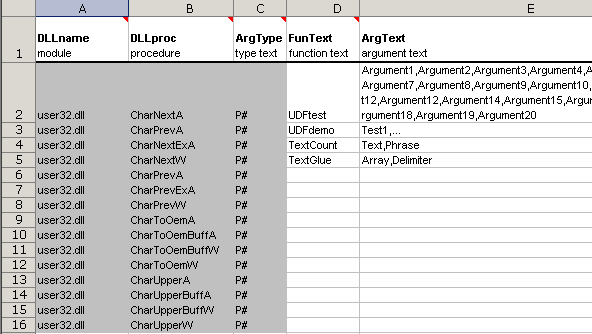
Screenshot of worksheet table to set function details for the
registration
Row 7 of this table is prefilled with function names of User32.dll which seem to be rarely used. Of course you can use any other dll here, with its accompanying functions.
Note that the worksheet has been protected (no password was set) to avoid accidental changes to fixed information and that rows 28-65536 are hidden.
The rest of the work is done using some XL4 macro code and some VBA code, as described on the next pages.


Frequently asked Questions
What is the purpose of registering a User Defined Function with Excel?
Where can I download the workbook to set up User Defined Functions?
What details need to be entered in the FunctionList sheet of the workbook?
What does the prefilled row 7 in the FunctionList table contain?
Can I use DLLs other than User32.dll for User Defined Functions?
Why is the worksheet protected and what does the protection prevent?
Which rows are hidden in the worksheet and why?
What types of code are used to complete the registration process?
Is there a password set for the worksheet protection?
What is the role of the XL4 macro and VBA code in this method?