
Charting a mathematical equation using Excel and defined names
Pages in this article
Getting x values
The next task is to get a list if x values we can use for the x-axes of the chart. A little known fact, is that when a defined name is used to name a formula this formula will be an array formula by default. We're going to put that to use.
First we need a set of incrementing numbers. We'll use the ROW worksheet function for that.
When we define this name local to worksheet Sheet1:
Name: Sheet1!x
RefersTo: =ROW(1:20)
and we enter an array formula into cells A1:A20 (select A1:A20 in Sheet1 and type =x, then hit control-shift-enter) we get this result:
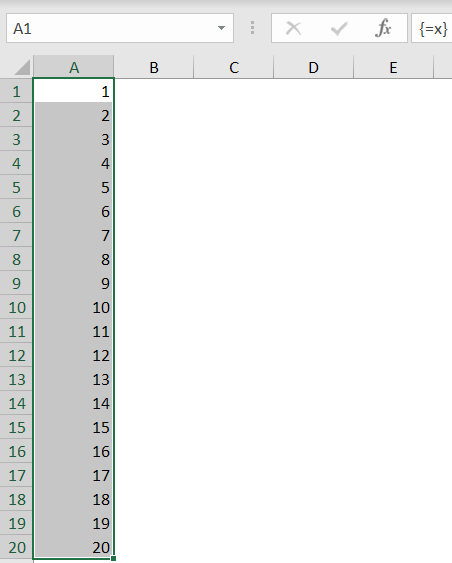
But we want the number of x-values to be dependent on a number entered into a cell. We'll use the OFFSET worksheet function for this purpose:
=ROW(OFFSET(Sheet1!$A$1,0,0,20,1))
If we replace the previous formula in "Sheet1!x" with the one above,
the result will remain the same as shown above.
All it takes now is replace the fixed 20 with a cell reference:
=ROW(OFFSET(Sheet1!$A$1,0,0,Sheet1!$B$5,1))
Now we have the numbers 1 to 20 (or up to whatever number we enter into cell B5 on sheet1).
But we need more flexibility, we want to be able to set a minimum and a maximum value for x and use the 1-20 range to space out these limits.
Let's define these named ranges:
To get a series of "xNumberOfPoints" from xStart to xEnd, the following formula applies:
xPoint=xStart+xRange/(xNumberOfPoints-1)*Counter(1 to xNumberOfPoints-1)
So applying the approach depicted above:
=xStart+xRange/(xNumberOfPoints-1)*(ROW(OFFSET(Sheet1!$A$1,0,0,xNumberOfPoints,1))-1)
We'll name this new formula (surprisingly): Sheet1!x
Note:
Editing and creating names is much easier with the free Name Manager.


Frequently asked Questions
What is the purpose of using defined names in charting a mathematical equation in Excel?
How can you generate a list of x values for the x-axis of a chart using Excel formulas?
What is the role of the ROW worksheet function in creating x values?
How do you define a named range in Excel that refers to a formula generating an array of numbers?
How can the OFFSET function be used to make the number of x values dynamic based on a cell input?
What named ranges are needed to set minimum and maximum x values and the number of points?
How do you calculate a series of x points spaced between a start and end value?
What is the formula to generate x points from xStart to xEnd with a specified number of points?
Why is the Name Manager recommended for editing and creating names in Excel?
How do array formulas work when using defined names in Excel?