
Showing An Array On A Form; Autosizing ColumnWidths Of A ListBox
Content
Introduction
For a project I needed a quick way to display the content of an array to the user. I didn't want to use a worksheet, but opted for a userform. The data I wanted to show was contained in an array. The array contained something like:
So I figured I'd put a listbox on a userform and make sure the column widths of the listbox resize with the data I want shown. That proved far from easy...
UserForm Setup
I devised a userform that looks like this:
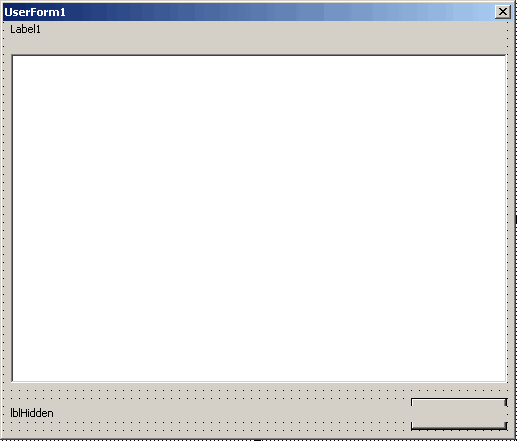
The form contains these controls (and I list the most important properties too):
To be able to use the form I have added a couple of properties and methods to use:
Which all sums up to this VBA code behind the UserForm:
' Module : ufShowTable
' Company : JKP Application Development Services (c)
' Author : Jan Karel Pieterse (jkp-ads.com)
' Created : 14-5-2008
' Purpose : Code to handle showing of table on this userform
'-------------------------------------------------------------
Option Explicit
Private mvTable As Variant
Private mbAutoColWidths As Boolean
Private mdFormWidth As Double
Private mdFormHeight As Double
'Code for form resizing courtesy:
'Stephen Bullen, www.oaltd.co.uk
'Rob Bovey, www.appspro.com
'Declare an object for the CFormResizer class to handle resizing for this form
Dim mclsResizer As CFormResizer
'----------------------EVENT CODE ----------------------
Private Sub cmbClose_Click()
Me.Hide
End Sub
''''''''''''''''''''''''''''''''''''''''''''''''''''''''''''''
' Comments: When the form is resized, the UserForm_Resize event
' is raised, which we just pass on to the Resizer class
'
' Date Developer Action
' ------------------------------------------------------
' 07 Oct 04 Stephen Bullen Initial version
'
Private Sub UserForm_Resize()
If mclsResizer Is Nothing Then Exit Sub
mclsResizer.FormResize
End Sub
'----------------------METHODS----------------------
Public Sub Initialise()
'---------------------------------------------------
' Procedure : Initialise
' Company : JKP Application Development Services (c)
' Author : Jan Karel Pieterse (jkp-ads.com)
' Created : 14-5-2008
' Purpose : Initialises the form and makes sure the listbox resizes according to the data
'-------------------------------------------------------------------------
Dim lRowCt As Long
Dim lColCt As Long
Dim lLengths() As Long
On Error GoTo LocErr
On Error GoTo LocErr
ReDim lLengths(UBound(mvTable, 2))
With lbxTable
.Clear
.ColumnCount = UBound(mvTable, 2) + 1
For lRowCt = LBound(mvTable, 1) To UBound(mvTable, 1)
For lColCt = LBound(mvTable, 2) To UBound(mvTable, 2)
'Store the largest string length of each column of the array
lLengths(lColCt) = Application.Max(4, lLengths(lColCt), Len(mvTable(lRowCt, lColCt)))
If lColCt = LBound(mvTable, 2) Then
'first item has to be added through additem
.AddItem mvTable(lRowCt, lColCt)
Else
.List(.ListCount - 1, lColCt - 1) = CStr(mvTable(lRowCt, lColCt))
End If
Next
Next
End With
If AutoColWidths Then
'Now autosize the ColumnWidths
SetWidths lLengths()
End If
'Create the instance of the form resizer class
Set mclsResizer = New CFormResizer
'Tell it where to store the form dimensions
mclsResizer.RegistryKey = GSREGKEY
'Tell it which form it's handling
Set mclsResizer.Form = Me
'Temporarily disable adjusting lbxtable, it has been sized already
lbxTable.Tag = ""
'Adjust dimensions of form using new dimensions of the listbox
'The form_resize event handles the positioning of the other controls on the form
Me.Width = lbxTable.Left + lbxTable.Width + 12
Me.Height = lbxTable.Top + lbxTable.Height + 30 + cmbClose.Height
'Enable size of listbox again
lbxTable.Tag = "WH"
TidyUp:
On Error GoTo 0
Exit Sub
LocErr:
Select Case ReportError(Err.Description, Err.Number, "Initialise", "Form ufShowTable")
Case vbRetry
Resume
Case vbIgnore
Resume Next
Case vbAbort
Resume TidyUp
End Select
End Sub
Private Function SetWidths(lLengths() As Long)
'--------------------------------------------------
' Procedure : SetWidths
' Company : JKP Application Development Services (c)
' Author : Jan Karel Pieterse (jkp-ads.com)
' Created : 14-5-2008
' Purpose : Sets the column widths of the listbox according to an array of max text lengths
'--------------------------------------------------
Dim lCt As Long
Dim sWidths As String
Dim dTotWidth As Double
On Error GoTo LocErr
For lCt = 1 To UBound(lLengths)
With lblHidden
'Using repeating letter m to determine width because that is a relatively wide letter.
'To ensure text always fits, use capital M instead
.Caption = String(lLengths(lCt), "m")
End With
dTotWidth = dTotWidth + lblHidden.Width
If Len(sWidths) = 0 Then
sWidths = CStr(Int(lblHidden.Width) + 1)
Else
sWidths = sWidths & ";" & CStr(Int(lblHidden.Width) + 1)
End If
Next
'Now set the widths of the columns
lbxTable.ColumnWidths = sWidths
'Adjust the dimensions of the listbox itself. You may want to adjust the constants
'I hard coded here.
'Listbox will always be at least 200 wide
lbxTable.Width = Application.Min(Application.Max(200, dTotWidth + 12), lbxTable.Width)
'Listbox will always be at least 48 high.
lbxTable.Height = Application.Min(Application.Max((lbxTable.ListCount + 1) * 12, 48), lbxTable.Height)
TidyUp:
On Error GoTo 0
Exit Function
LocErr:
Select Case ReportError(Err.Description, Err.Number, "SetWidths", "Form ufShowTable")
Case vbRetry
Resume
Case vbIgnore
Resume Next
Case vbAbort
Resume TidyUp
End Select
End Function
'----------------------PROPERTIES----------------------
Public Property Get Table() As Variant
Table = mvTable
End Property
Public Property Let Table(ByVal vTable As Variant)
mvTable = vTable
End Property
Public Property Let Title(ByVal sTitle As String)
lblTableTitle.Caption = sTitle
End Property
Public Property Get AutoColWidths() As Boolean
AutoColWidths = mbAutoColWidths
End Property
Public Property Let AutoColWidths(ByVal bAutoColWidths As Boolean)
mbAutoColWidths = bAutoColWidths
End Property
Public Property Get FormWidth() As Double
FormWidth = Me.Width
End Property
Public Property Let FormWidth(ByVal dFormWidth As Double)
Me.Width = dFormWidth
End Property
Public Property Get FormHeight() As Double
FormHeight = Me.Height
End Property
Public Property Let FormHeight(ByVal dFormHeight As Double)
Me.Height = dFormHeight
End Property
The attentive reader will have spotted that I hard-coded some constants into the code. Of course if you develop this thing for yourself, you'd have used constants or some other way to control (for example) the maximum column widths.
How The Resize Works
Various people have devised a trick to calculate the column widths. Some
use constants, which which the number of characters to be displayed is multiplied.
This trick doesn't work reliably since screen resolution and Font may affect
this.
The best method I know of is by using a (hidden) label with its AutoSize
property set to True. This label must have the same Font characteristics
as the ListBox. After changing the Caption of the Label, one can read its
width to fetch the size needed for the text.
The trick to make the resizing work lies in the Function SetWidths behind
the userform. I pass an array of character counts to the function (containing
the maximum # of characters for each column to be shown in the listbox).
Then for each column I change the caption of the label to an equal amount
of characters as the value in the array. I use the same character, since
the Font for the label is proportional. Thus, the letter used will determine
what width the label gets.
Then I read the label's width and string that value together to form the
ColumnWidths string (widths delimited by a ;).
The tricky part are the properties of the label. Set the WordWrap to False and the AutSize to True to make this work.
The end results looks like this:
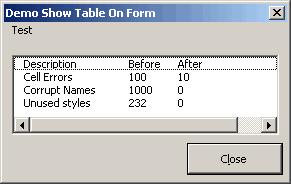
Great, isn't it?
Module code
To use the form, you can use this generic function:
' Module : modShowTable
' Company : JKP Application Development Services (c)
' Author : Jan Karel Pieterse (jkp-ads.com)
' Created : 2-4-2008
' Purpose : Shows a table on ufTable
'-------------------------------------------------------------------------
Option Explicit
Public Function ShowTable(vTable As Variant, sTableTitle As String, bAutoColWidths As Boolean) As Variant
'-------------------------------------------------------------------------
' Procedure : ShowTable
' Company : JKP Application Development Services (c)
' Author : Jan Karel Pieterse (jkp-ads.com)
' Created : 2-4-2008
' Purpose : Shows vTable on the userform ufShowTable, with a maximum width and height.
'-------------------------------------------------------------------------
Dim frmShowTable As ufShowTable
On Error GoTo LocErr
Set frmShowTable = New ufShowTable
With frmShowTable
.Table = vTable
.Title = sTableTitle
.Caption = GSAPPNAME
.AutoColWidths = bAutoColWidths
.Initialise
.Show
End With
TidyUp:
On Error GoTo 0
Exit Function
LocErr:
Select Case ReportError(Err.Description, Err.Number, "ShowTable", "Module modShowTable")
Case vbRetry
Resume
Case vbIgnore
Resume Next
Case vbAbort
Resume TidyUp
End Select
End Function
You use the function like this:
'-------------------------------------------------------------------------
' Procedure : demo
' Company : JKP Application Development Services (c)
' Author : Jan Karel Pieterse (jkp-ads.com)
' Created : 14-5-2008
' Purpose : Shows the usedrange on the form
'-------------------------------------------------------------------------
ActiveSheet.UsedRange.Select
ShowTable Selection.Value, "Test", True
End Sub
Conclusion
As you've seen it takes a little bit of trickery to get this to work. We've used a (hidden) label control with AutoSize set to True and WordWrap to False. Then we fetch that label's width to determine the width the text will occupy in the listbox.
Frequently asked Questions
What is the purpose of showing an array on a userform instead of a worksheet?
How is the userform set up to display the array data?
What controls and properties are used on the userform to display the listbox?
Which properties and methods are important for using the userform?
How does the column width autosizing work for the listbox?
Why is a hidden label used to calculate the column widths?
What label properties are necessary for the resizing trick to work?
How can the userform be used programmatically to show a table?
What is the purpose of the ShowTable function in the module code?
How do you call the ShowTable function to display data on the userform?
Comments